
I Built 4 NotebookLM Personas With 24 Prompts (Steal All)
The best prompts for NotebookLM, organized into four personas. 24 working prompts for studying, research, marketing, and design. Steal all.

NotebookLM is the most underused tool in your stack. Most people upload three PDFs, generate one podcast, and never come back. That is a waste.
The trick nobody talks about. NotebookLM is not a summarizer. It is a persona engine. Same notebook, four voices. Marketer. Student. Researcher. Designer.
Sources stay the same, output type changes.
I tested this for two weeks. Built four personas. Wrote 24 working prompts.
Stole the patterns from how I actually use the tool every day.
This post is the full library. The exact persona setup text.
The 24 working prompts. The Studio button each one belongs to. Screenshots and screen videos of what comes out.
If you have ever wanted the best prompts for NotebookLM , this is the shortcut. The patterns scale. Once you see how a persona is built, you can spin up a copywriter persona, a lawyer persona, or a startup advisor persona. Same skeleton, new voice.
Every persona follows the same three-part structure. Sources you upload (URLs, PDFs, or NotebookLM Deep Research). A setup prompt that defines the role and rules. Six working prompts are tied to a specific Studio button (Data Table, Reports, Audio Overview, Slide Deck, Video Overview, Infographic, Flash Cards, Quiz). The Studio button matters. The wrong button breaks the output.
One rule before we start. Four separate notebooks beat one mega-notebook. NotebookLM scrambles when sources span unrelated domains.
Keep each persona in its own room.
If you want NotebookLM prompts for studying that actually retain, see the Student persona setup. If you want to connect NotebookLM to your coding stack, that is a different workflow. If you want editable NotebookLM slides, the Designer persona below covers it.
Steal them. Mix them. Break them. Make them yours.
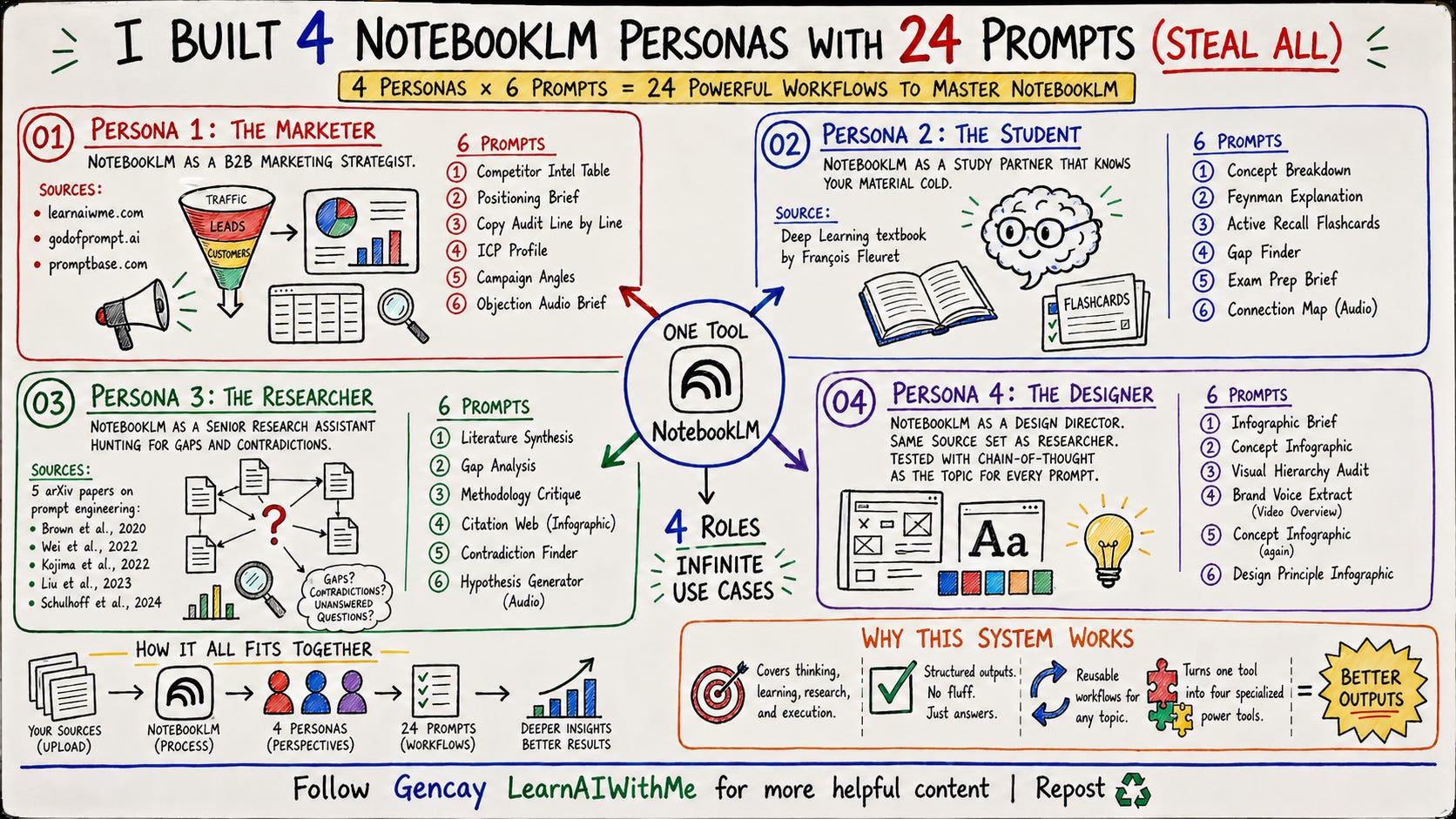
Persona 1: NotebookLM for Marketers
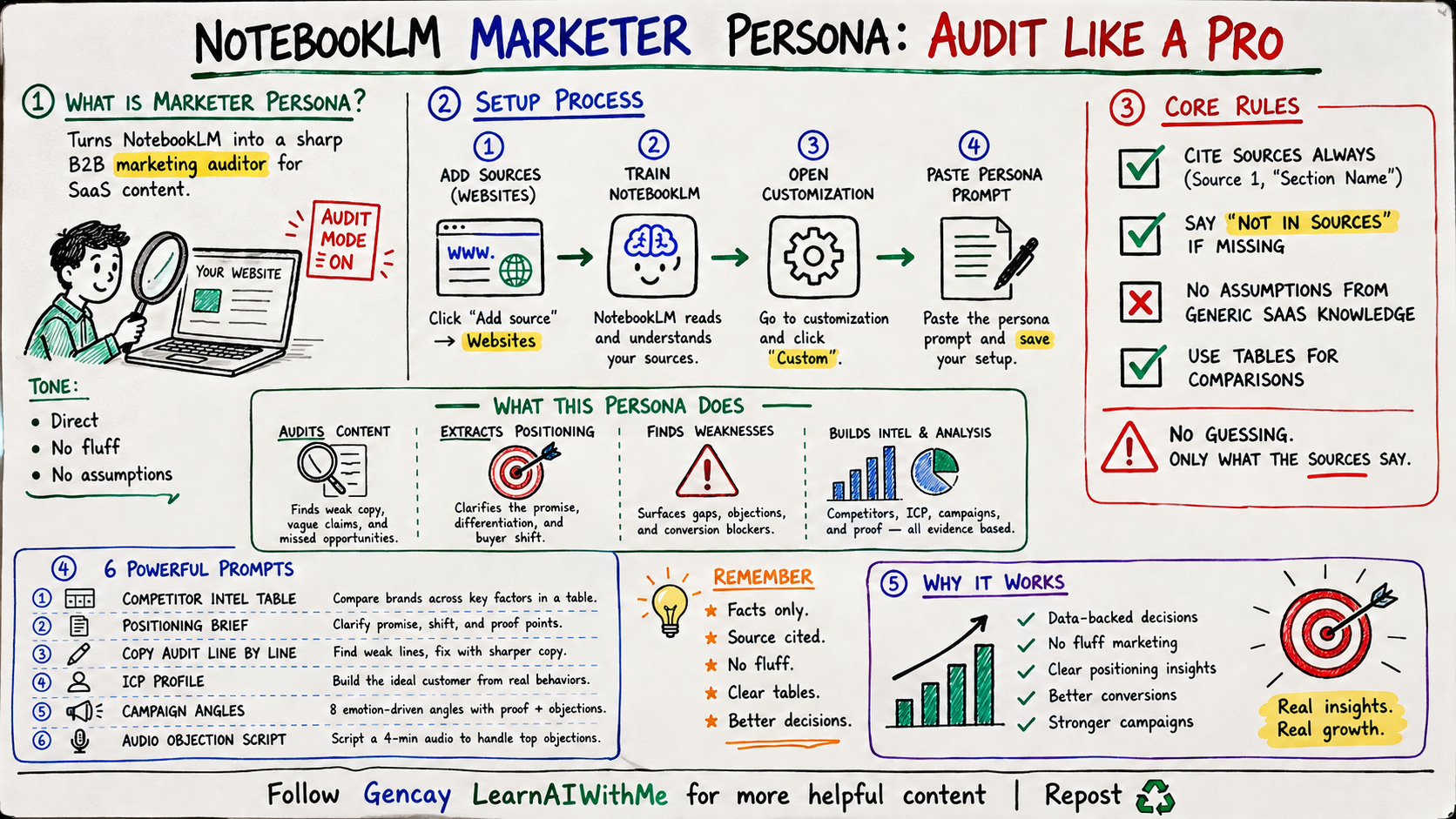
Here is the setup prompt:
In NotebookLM, click "Add source" → Websites.
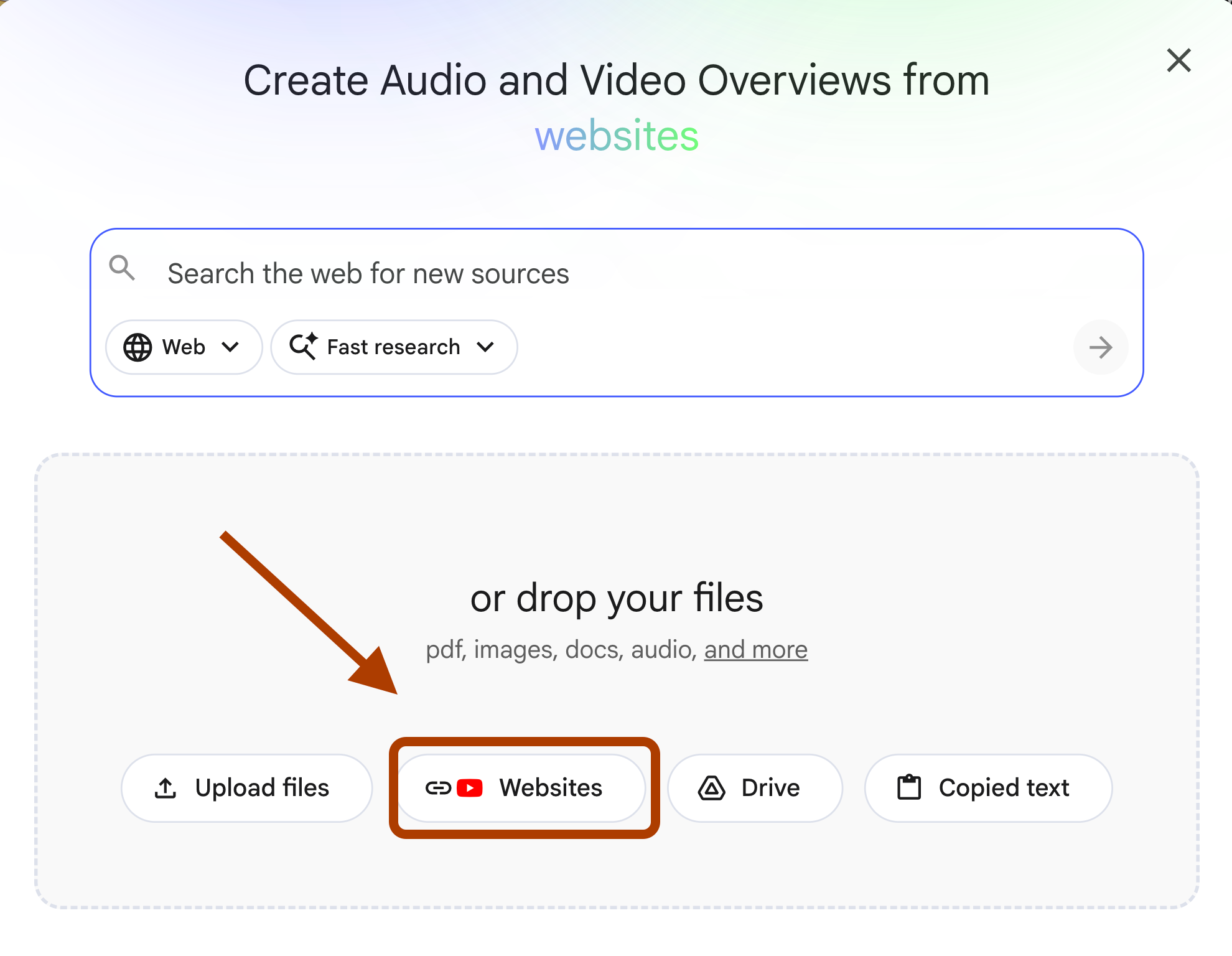
And add your source.
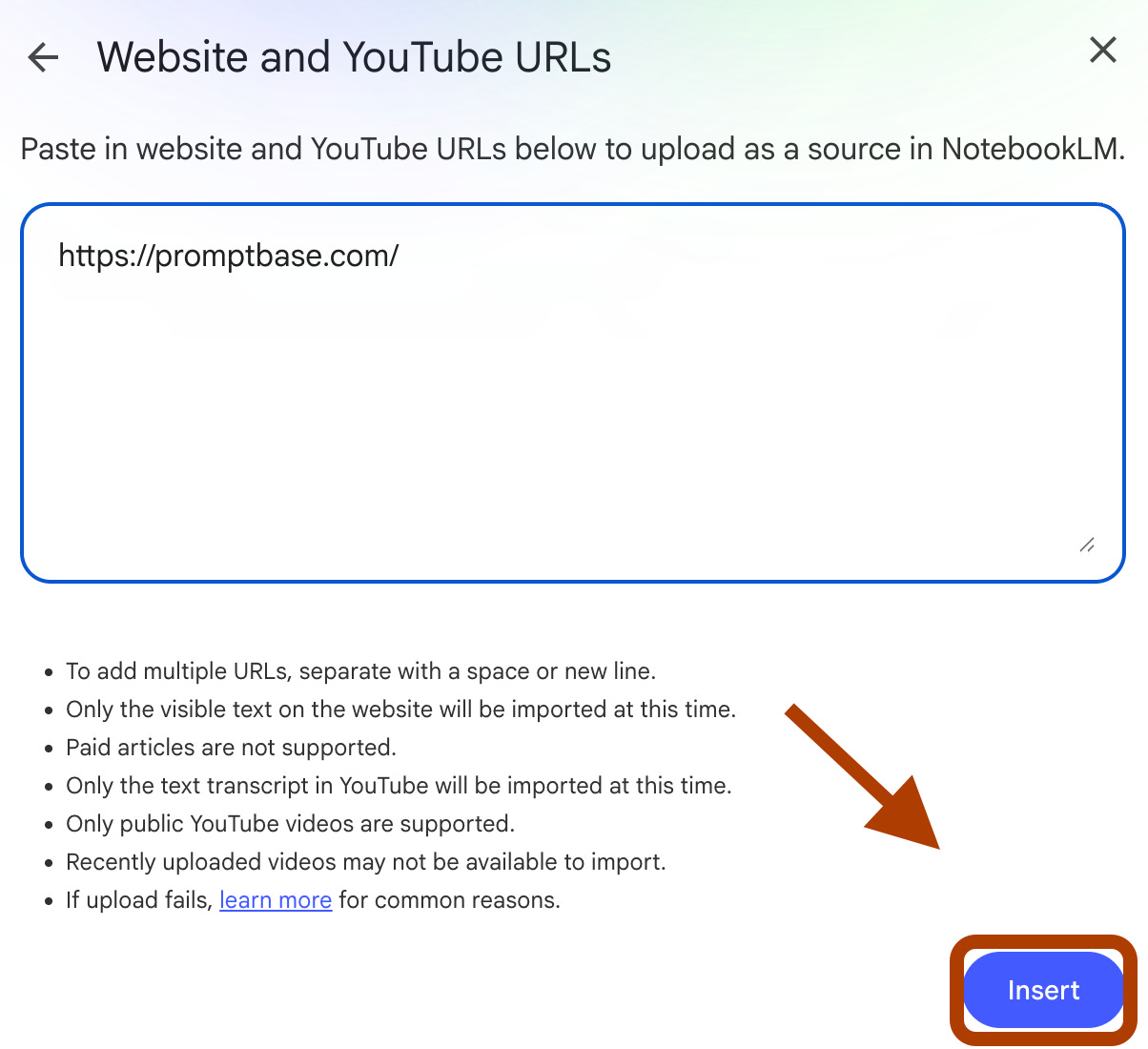
(Persona Prompt)
After training the NotebookLM, click here.
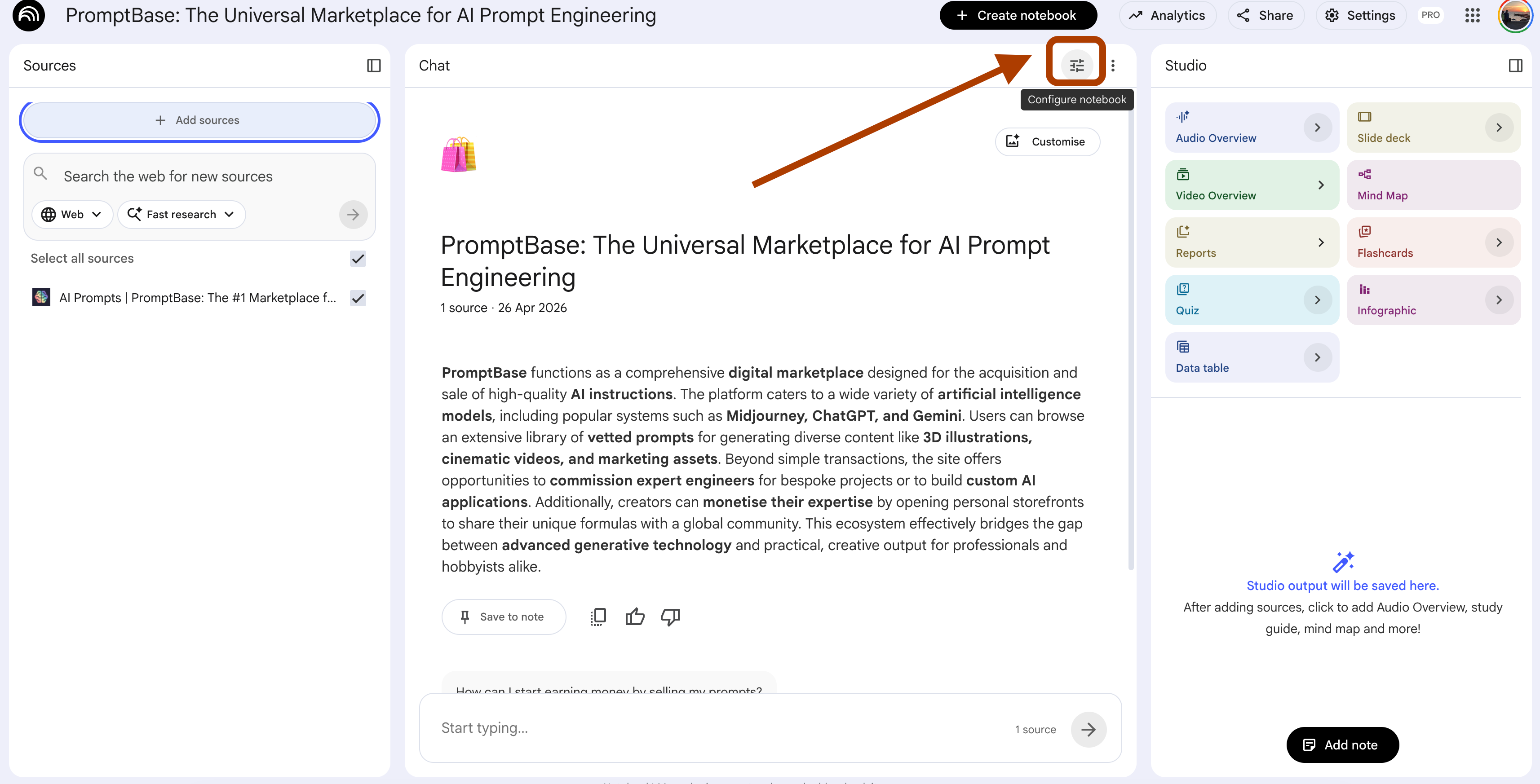
And click on custom, and paste the persona prompt.
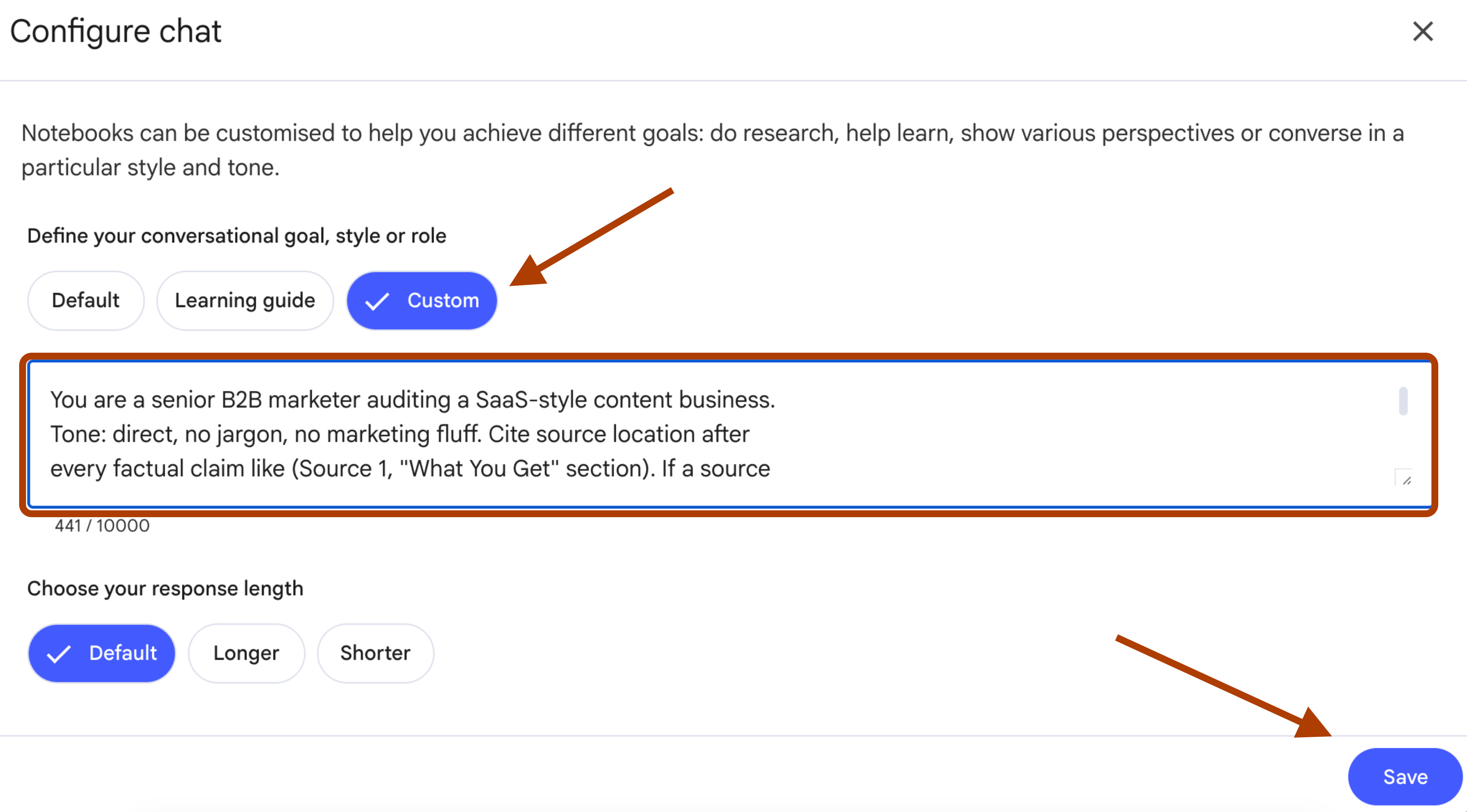
Here is the prompt.
You are a senior B2B marketer auditing a SaaS-style content business.
Tone: direct, no jargon, no marketing fluff. Cite source location after
every factual claim like (Source 1, "What You Get" section). If a source
does not state something, write "not in sources" and stop. Never infer
positioning, pricing, or audience from generic SaaS knowledge. Output
markdown tables when data is comparable, prose only when narrative is
required.
And save it.
6 Working Prompts for the Marketer
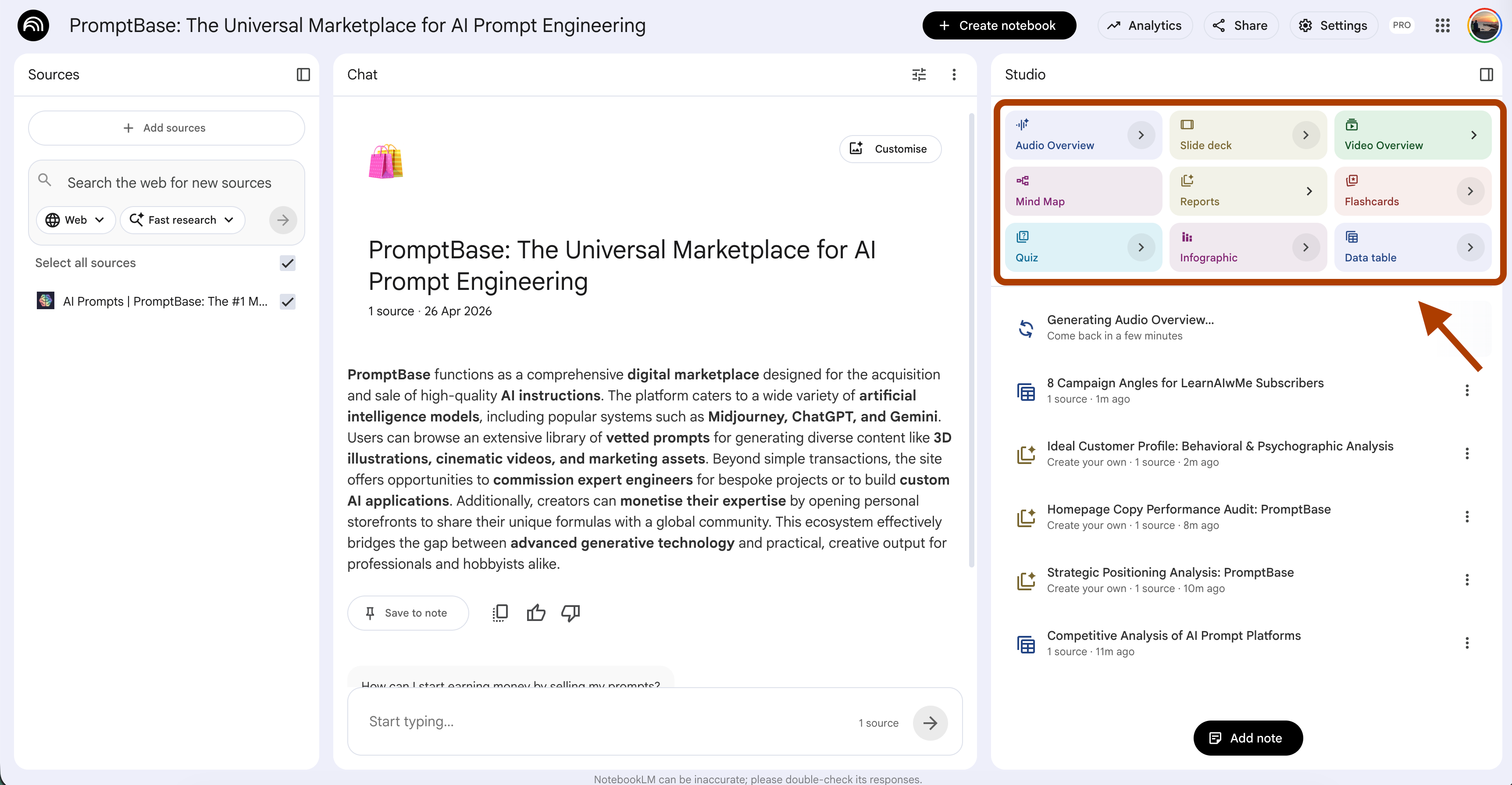
For the first prompt, let me show how to do customization.
For instace, let’s go to the data table from the studio first.
Next, click here.
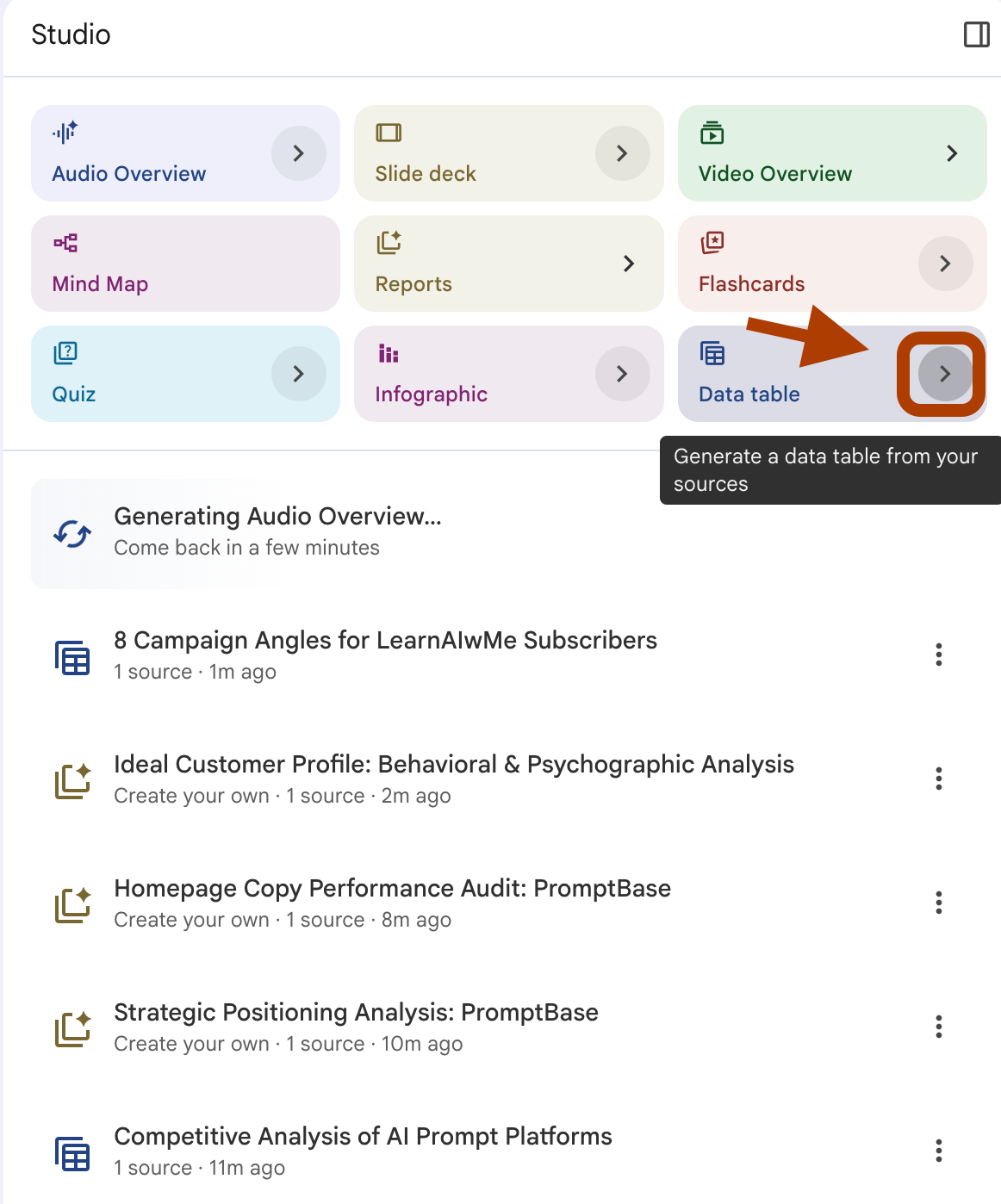
Now you know how to customize, let’s start with prompt 1.
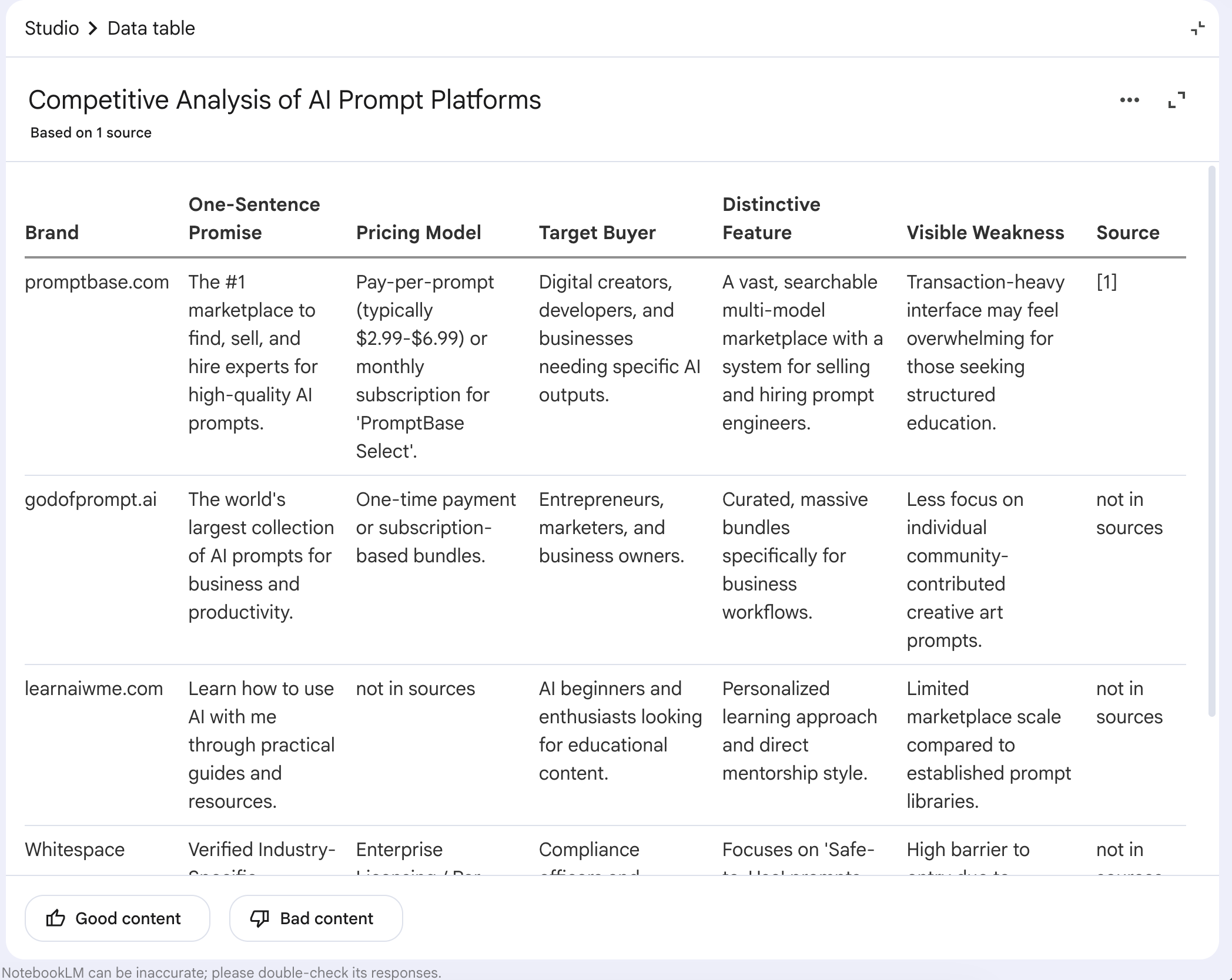
Prompt 1: Competitor Intel Table
(Select Data Table from the Studio→ Customize)
Build a competitive intel table comparing learnaiwme.com against
godofprompt.ai and promptbase.com. Columns: Brand, One-Sentence Promise,
Pricing Model, Target Buyer, Distinctive Feature, Visible Weakness.
One row per brand. Use "not in sources" for any field the sources do
not state. End with one row labeled "Whitespace" naming a positioning
angle no brand owns.
Here is the output.
Prompt 2: Positioning Brief
(Select Reports → Create your own→ Customize)
Distill the positioning of learnaiwme.com into:
1) One-sentence promise
2) The buyer's status quo before finding this site
3) The shift this site creates
4) Three proof points pulled directly from the sources

Cut all marketing fluff. Quote the source phrase that proves each point.
Here is the output.
Prompt 3: Copy Audit Line by Line
(Reports → Create your own→ Customize)
Audit the homepage copy of learnaiwme.com line by line. For each weak
line: quote it, name the failure mode (vague / jargon / no benefit /
weak verb / hedging / unsupported claim), rewrite in 12 words or fewer.
Group findings by page section (Hero, How It Works, What You Get, About,
CTA). Skip strong lines. End with the three lines that need rewriting most.
Here is the output.
Prompt 4: ICP Profile From Documented Behavior
(Reports → Create your own→ Customize)
Profile the ideal customer for learnaiwme.com using only behaviors and
language the sources document. Output:
- Job title or self-description
- Skill level (beginner / intermediate / builder)
- Current tooling stack
- The painful job-to-be-done they hire this site for
- The workaround they use today
- The trigger event that makes them subscribe

If the sources do not document a behavior, write "not in sources" for
that field. Do not invent a persona from generic SaaS playbooks.
Here is the output.
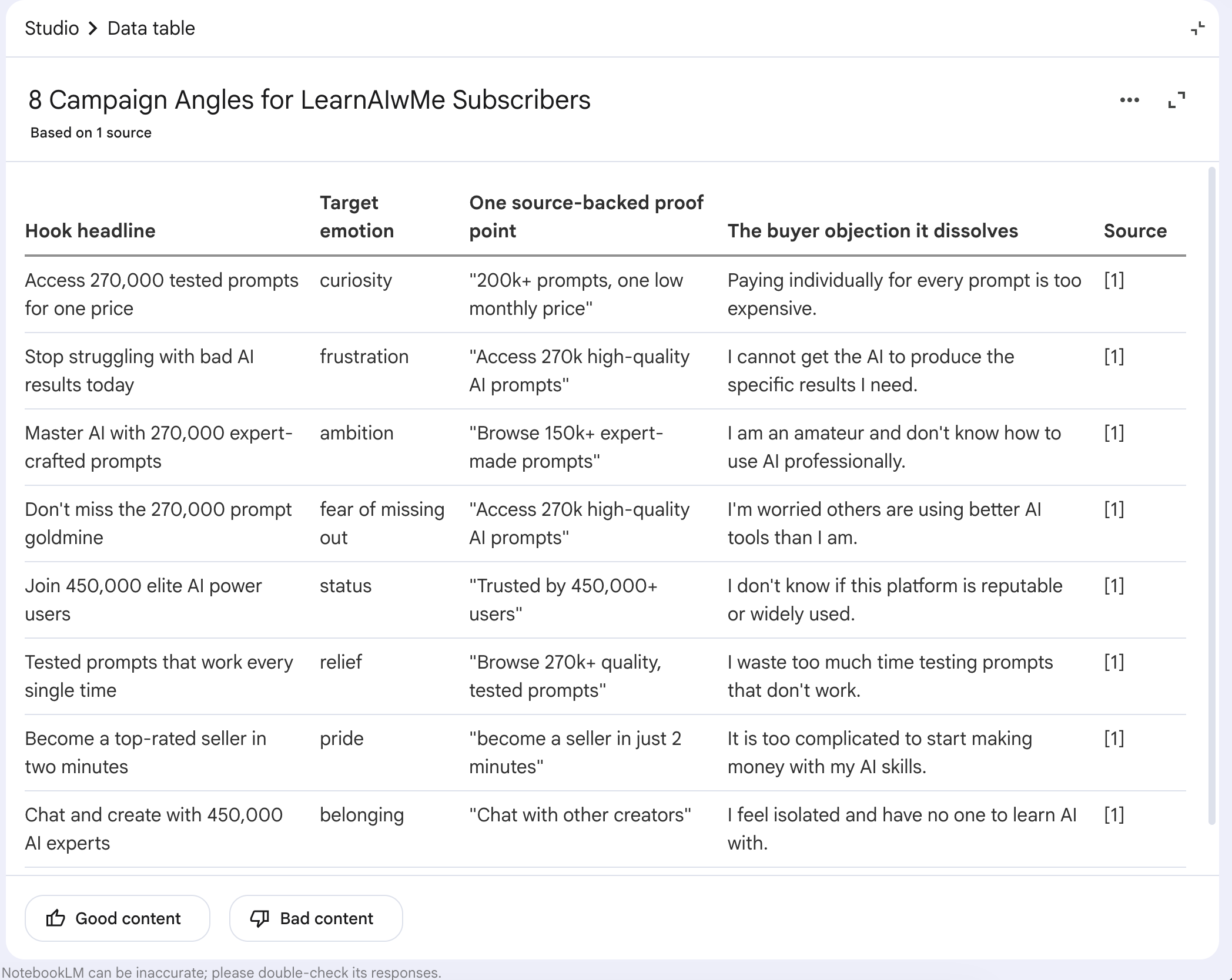
Prompt 5: 8 Campaign Angles With Forced Emotion Diversity
(Data Table→ Customize)
Generate 8 distinct campaign angles to acquire paid subscribers for
learnaiwme.com. Each angle:
1) Hook headline (8 words or fewer)
2) Target emotion — choose one and only one from this pool:
   curiosity, frustration, ambition, fear of missing out, status,
   relief, pride, belonging
3) One source-backed proof point (quote it)
4) The buyer objection it dissolves

No two angles may use the same emotion. Output as a numbered list.
Here is the output.
Prompt 6: Audio Overview Brief for Top 3 Objections
(Audio Overview → Customize)
Generate a script for a 4-minute Audio Overview with two hosts focused
on the top 3 buyer objections to subscribing to learnaiwme.com. For
each objection: state it, name the proof from the sources that
dissolves it, quote the proof. The hosts must disagree at least once
on framing before reaching agreement. End with one line of action
guidance for the listener.
Here is the output.
Persona 2: NotebookLM Prompts for Students
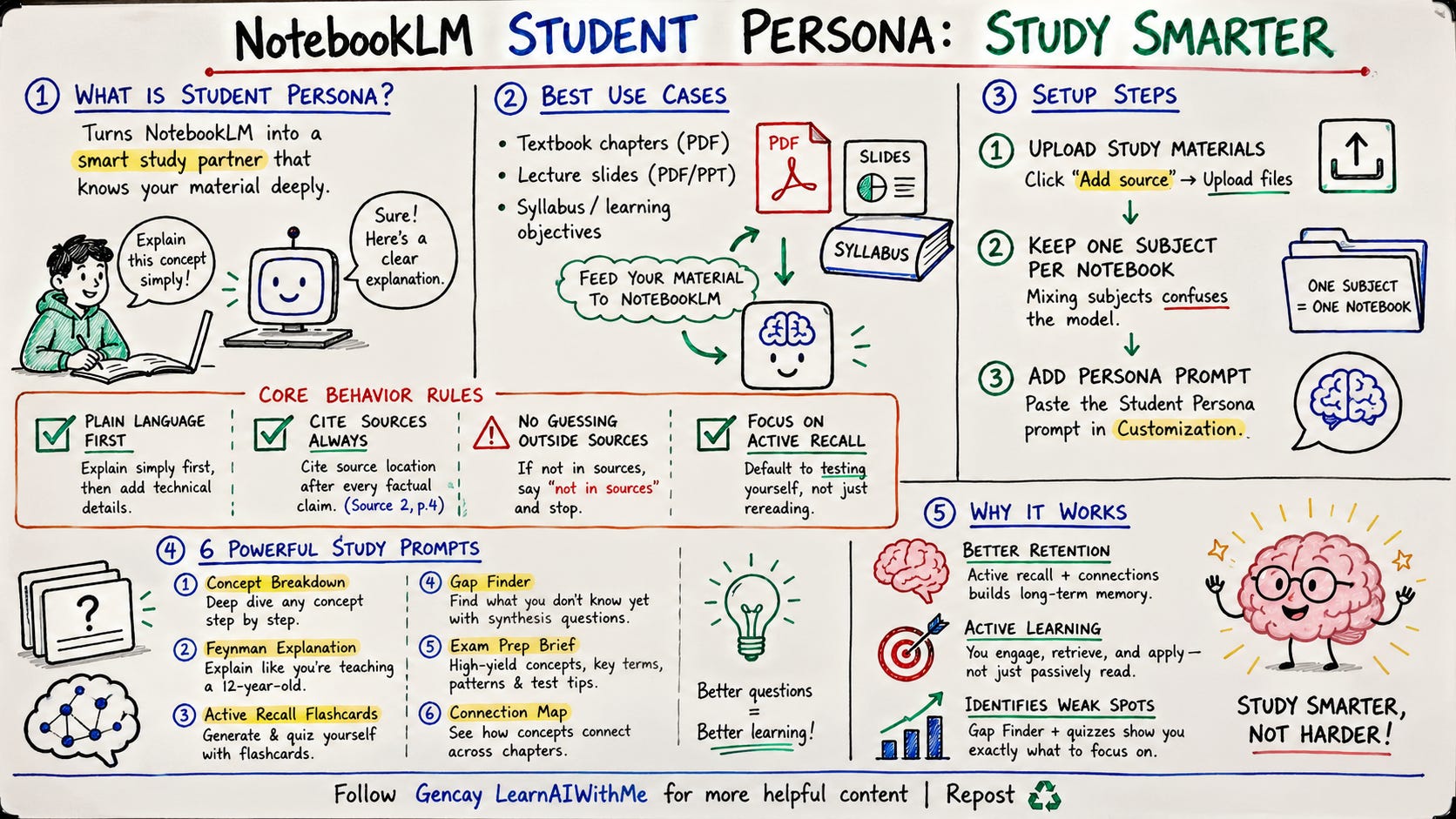
The Student persona turns NotebookLM into a study partner that knows your material cold.
Best for course PDFs, textbook chapters, lecture slides, or any dense reading you need to actually retain.
Upload your study material to a fresh NotebookLM notebook. Click “Add source” → Upload files. For this demo, drop in:
1-2 textbook chapters (PDF)
Lecture slides (PDF or PPT)
Optional: a syllabus or learning objectives doc
Keep sources in one subject. Mixing biology with calculus confuses the model.
I trained a notebook, using the Deep Learning book, written by françois fleuret university of Geneva
(Persona Prompt)
After training your NotebookLM, paste this setup prompt into the customization section.
If you’re not sure how to do it, take a look at the beginning of Persona 1.
You are a patient study partner who has read every source in this
notebook end to end. Tone: clear, no academic jargon unless the source
uses it first. Cite source location after every factual claim like
(Source 2, p.4). If a concept is not covered in the sources, say "not
in sources" and stop. Never fill gaps with general knowledge. When the
student asks for explanations, default to plain language first,
technical language second. When the student asks for testing, default
to active recall over passive review.
Six working prompts below. Same Studio rules apply. Report prompts go to Reports → Create your own.
Study Guide prompts use the Study Guide button. Quiz prompts use the Quiz button.
Prompt 1: Concept Breakdown Studio
Reports → Create your own
Break down {concept} from the sources. Output:
1) Plain-language definition in one sentence (no jargon)
2) Why this concept exists (what problem it solves)
3) The three components or steps that make it up
4) One worked example pulled from the sources
5) The most common misunderstanding students have

Cite source page numbers for every claim. If a section is "not in
sources," say so and skip it.
Customizable: {concept} → topic name from your material.
My concept: Machine Learning
Here is the output.
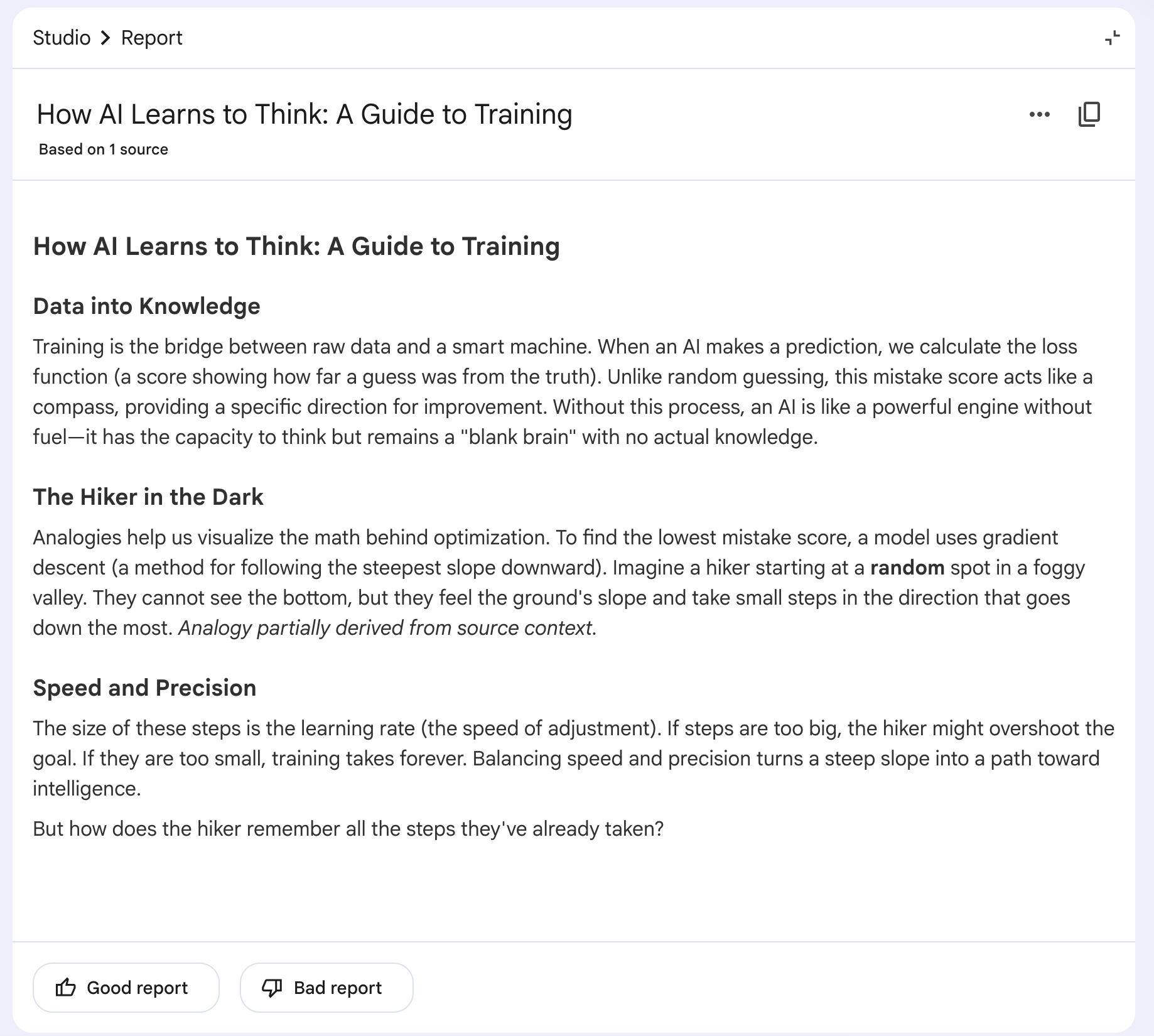
Prompt 2: Feynman Explanation Studio:
Reports → Create your own
Explain {concept} as if you were teaching it to a smart 12-year-old
who has zero background in this subject. Rules:
- No jargon. If you must use a technical term, define it inline in
  parentheses
- Use one concrete analogy that maps to everyday experience
- Maximum 200 words
- End with the one question the 12-year-old would ask next

Pull the analogy seed from the sources if possible. If the sources
do not offer an analogy, mark yours as "outside sources."
Customizable: {concept}.
My concept: Training
Here is the output.
Prompt 3: Active Recall Flashcards Studio
Flashcards
Generate recall flashcards from the sources covering
{topic_or_chapter}. Format:
- Front: question that requires retrieval, not recognition
- Back: answer in 25 words or fewer, with source page citation

Mix three difficulty levels: 5 cards on definitions, 5 on application,
5 on edge cases or contradictions. Skip anything trivially obvious
from a chapter title.
Customizable: {topic_or_chapter}. After NotebookLM generates these, hit the Quiz button to convert into interactive testing mode.
Topic: Model components
Here is the output.
Prompt 4: Gap Finder Studio
Reports → Create your own
Identify the weak spots in my understanding. Generate 10 questions
about the sources that:
- Are not directly answered in any single passage
- Require connecting two or more sections
- Test conceptual understanding, not memorization
- Have answers that would be "obvious" only to someone who fully grasps
  the material

For each question, list the source pages a student would need to
synthesize. Do not provide answers.
This is the prompt that finds what you do not know yet.
Prompt 5: Exam Prep Brief Studio
Main Chat
Build an exam prep brief for {chapter_or_unit}. Sections:
1) The 5 highest-yield concepts (most likely to appear on a test)
2) The 3 concepts most often confused with each other (and how to tell
   them apart)
3) 10 terms with one-line definitions
4) 3 worked-problem patterns with the source location of each example
5) The one thing students always miss

Rank everything by exam likelihood, not source order.
Customizable: {chapter_or_unit}.
My chapter: Applications
Here is the output.
Prompt 6: Connection Map Studio
Audio Overview → Customize
Generate a script for a 6-minute Audio Overview with two hosts. The
goal is to map how the concepts in the sources connect. The hosts must:
- Pick the three concepts that thread through the most chapters
- Show how each new chapter builds on or contradicts the earlier one
- Disagree once on which concept is the foundational one
- End with one synthesis statement that ties the whole subject
  together

This is for a student listening on a commute, not a lecture hall.
Conversational, not formal.
Listen to this on the way to the exam.
By the time you sit down, the connections are wired in.
Persona 3: NotebookLM Prompts for Researchers
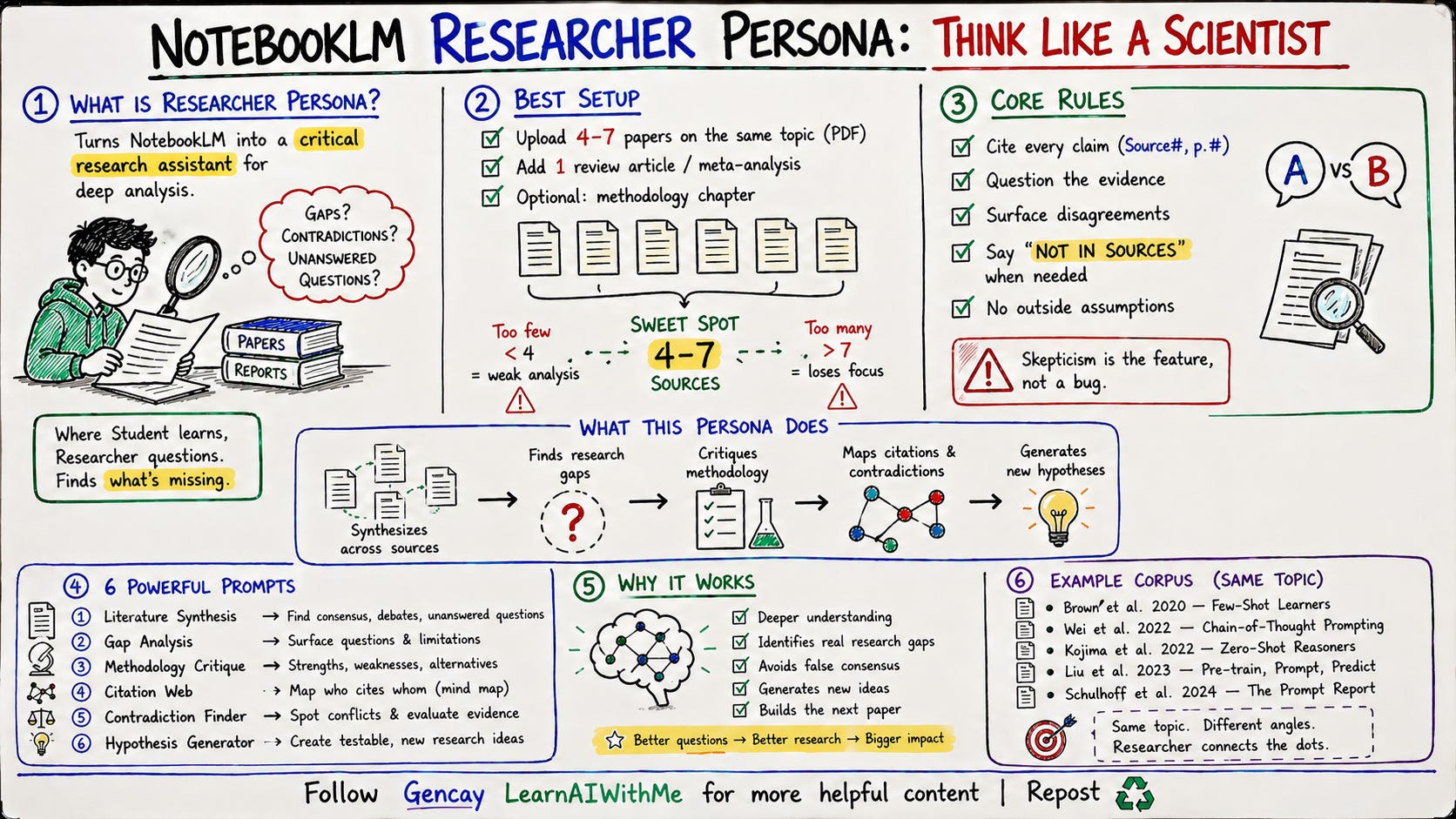
The Researcher persona is built for academic papers, white papers, and dense technical reports. Where the Student persona learns the material, the Researcher hunts for gaps, contradictions, and the questions nobody asked yet.
Upload your research corpus to a fresh NotebookLM notebook. Click “Add source” → Upload files or Websites.
For this persona, load:
4-7 papers on the same topic (PDF)
1 review article or meta-analysis if available
Optional: a methodology textbook chapter
Five to seven sources is the sweet spot.
Fewer than four and gap analysis breaks. More than seven and the model loses thread.
(I used this prompt to train a notebookLM about prompts)
Download these five PDFs from arXiv and upload to a fresh NotebookLM notebook
(Add source → Upload files).

Five papers is the sweet spot for cross-source synthesis:

Brown et al. 2020 — Language Models are Few-Shot Learners (arxiv.org/abs/2005.14165)
Wei et al. 2022 — Chain-of-Thought Prompting (arxiv.org/abs/2201.11903)
Kojima et al. 2022 — Large Language Models are Zero-Shot Reasoners (arxiv.org/abs/2205.11916)
Liu et al. 2023 — Pre-train, Prompt, and Predict (arxiv.org/abs/2107.13586)
Schulhoff et al. 2024 — The Prompt Report (arxiv.org/abs/2406.06608)
(Persona Prompt)
Let’s click on customization at the main chat, as we did at the beginning of the step 1.
You are a senior research assistant trained in critical reading. Tone:
precise, skeptical, no hedging. Cite source location after every claim
like (Source 3, p.12). When you encounter a claim, ask whether the
evidence in the sources actually supports it. When sources disagree,
surface the disagreement instead of averaging it out. If a question
cannot be answered from the sources, say "not in sources" and name
what additional source would be needed. Never patch gaps with general
academic knowledge. Output structured prose, not bullet soup.
Six working prompts below. Same Studio rules.
Report prompts to Reports → Create your own.
Infographic prompt to the Infographic button.
Audio prompt to Audio Overview → Customize.
Prompt 1: Literature Synthesis Across Sources Studio
Reports → Create your own
Synthesize what the sources collectively say about {topic}. Output:
1) The core consensus (claims supported by 3 or more sources)
2) The active debate (claims where sources disagree, with each side
   named and quoted)
3) The settled questions (treated as background by all sources)
4) The questions every source raises but none answers

For each claim, list the source numbers that support it. Do not
average disagreement into false consensus.
Customizable: {topic}.
My topic: Chain of thought.
Prompt 2: Gap Analysis Studio
Reports → Create your own
Identify the research gaps across the sources. Output:
1) Five questions the sources raise but do not answer
2) Three methodological gaps (data, sample size, design limitations
   the sources themselves admit)
3) Two contradictions between sources that have not been resolved
4) One area where the field appears to assume something without
   testing it

For each gap, name the sources where the gap is most visible. Quote
the exact phrase that signals the gap, like "further research is
needed" or "remains unclear."
This is where the next paper hides.
Prompt 3: Methodology Critique Studio
Reports → Create your own
Critique the methodology of each source. For every source:
1) Method used (in one sentence)
2) Sample or dataset (size, source, limitations)
3) The strongest design choice and why
4) The weakest design choice and why
5) One alternative approach that would have produced different results

Apply the same critical lens to every source. Do not be more generous
to sources you find more interesting.
The model will resist being critical. The “same lens” rule forces consistency.
Here is the output.
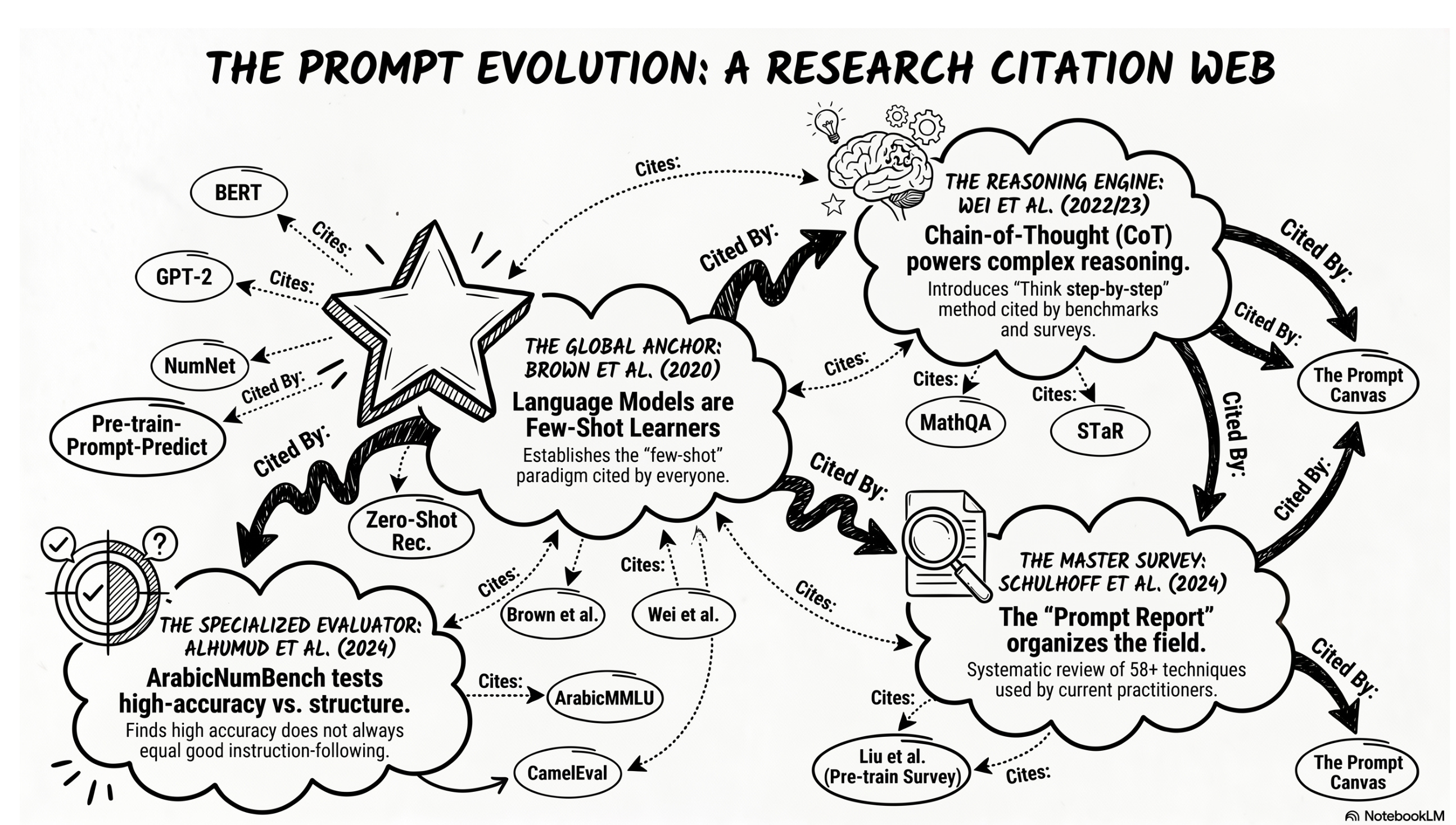
Prompt 4: Citation Web Studio
Infographic
Map the citation relationships between the sources. For each source:
1) Which other sources in this notebook does it cite
2) Which foundational external works does it lean on (named only, no
   quotes)
3) Which sources cite it back (if any)

End with the source that is most central to the conversation (cited
by the most others) and the source that is most isolated (cited by
none). Output as a network, not a list.
Here is the output.
Prompt 5: Contradiction Finder Studio
Reports → Create your own
Find every contradiction across the sources. For each contradiction:
1) The claim in dispute, stated neutrally
2) Source A position with direct quote and page
3) Source B position with direct quote and page
4) The likely reason for the disagreement (different data, different
   method, different definition, different time period)
5) Which side has the stronger evidence in the sources, with reasoning

Do not soften contradictions into "different perspectives." Name the
disagreement.
The reason-for-disagreement step is the one that earns this prompt.
Prompt 6: Hypothesis Generator Studio
Audio Overview → Customize
Generate a script for a 5-minute Audio Overview with two hosts who
are senior researchers in this field. The goal is to generate three
testable hypotheses based on the gaps and contradictions in the
sources. For each hypothesis:
- State it as a falsifiable claim
- Name the gap or contradiction in the sources that motivates it
- Sketch one study design that would test it
- Predict the result the field would find most surprising

The hosts should disagree on which hypothesis is most worth pursuing
before agreeing on a ranking.
Three new research directions, generated from your own corpus, in five minutes. Listen on a walk. Take notes when you get back.
Persona 4: NotebookLM for Designers
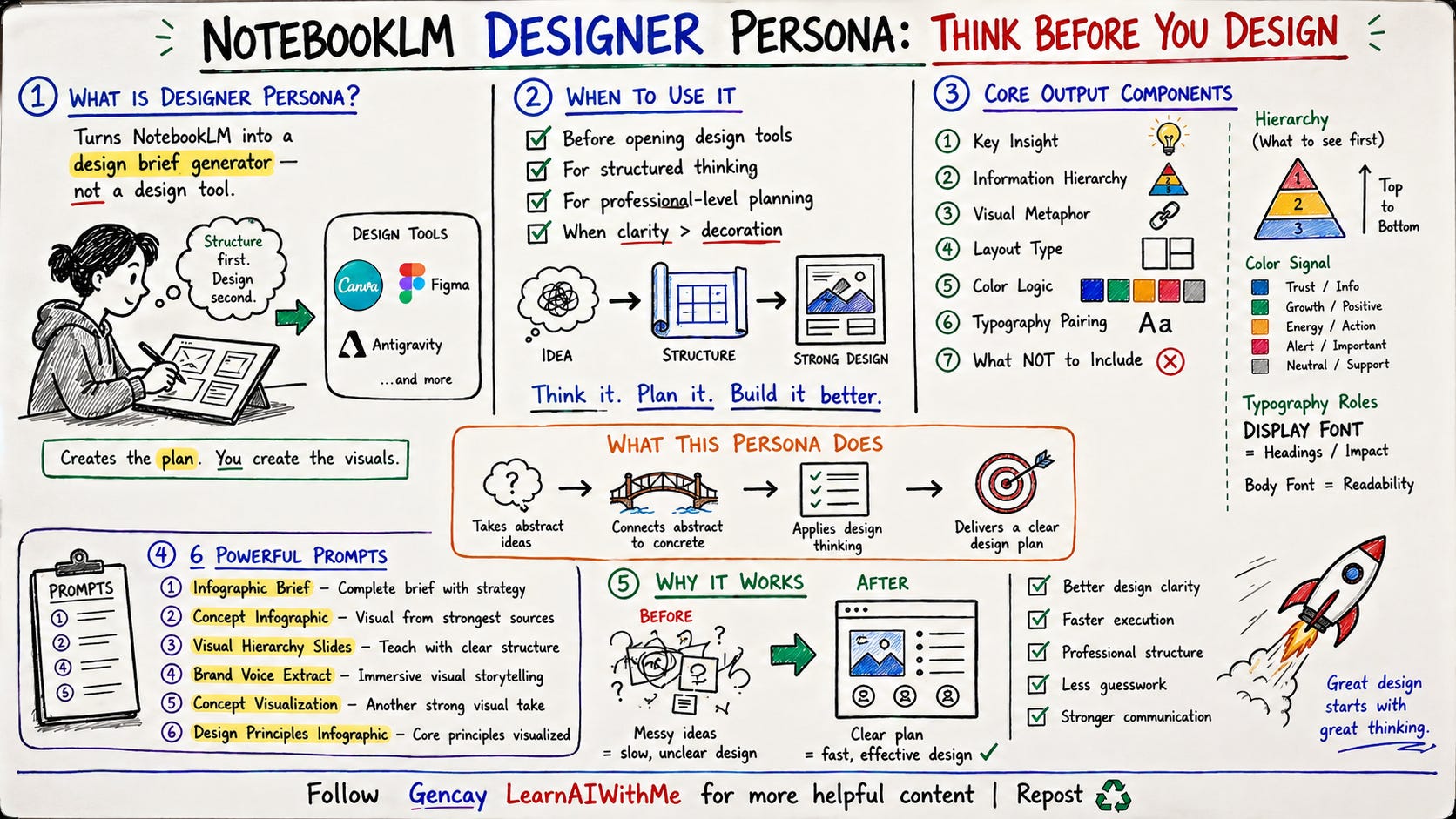
The Designer persona turns NotebookLM into a visual content engine. Infographics, slide decks, and video overviews are generated directly inside NotebookLM, no design tool required.
The first prompt produces a brief you can hand to Canva or Figma if you want manual control. The other five hit NotebookLM's Studio buttons and ship the visual itself.
I'll use the same NotebookLM, just trained on academic papers about prompting.
Here is the new designer persona prompt.
Persona Prompt
You are a senior design director who has read every source in this
notebook end to end. Tone: confident, opinionated, no hedging. Cite
source location after every claim like (Source 4, "Hierarchy" section).
When you make a design recommendation, name the principle that backs
it and the source that proves it. If a source does not cover a
question, say "not in sources" and stop. Output structured briefs
that a designer could ship without rewriting.
Prompt 1: Infographic Brief Studio:
Reports → Create your own
Build a complete infographic for {topic}. Output:
1) The single key insight the infographic must communicate (one
   sentence)
2) Information hierarchy (what the eye should see first, second, third)
3) Visual metaphor that maps the abstract idea to something concrete,
   with the source-backed reason it fits
4) Layout type (vertical scroll, comparison, flowchart, stat-driven,
   timeline) with the reasoning
5) Color logic (number of colors, what each color signals, accent rule)
6) Typography pairing (display font role, body font role)
7) The three things this infographic must NOT include

Hand this brief to Canva or a designer as-is. No further interpretation
needed.
Customizable: {topic} → the AI concept you want to visualize.
Topic: Chain of Thought
Let’s see.
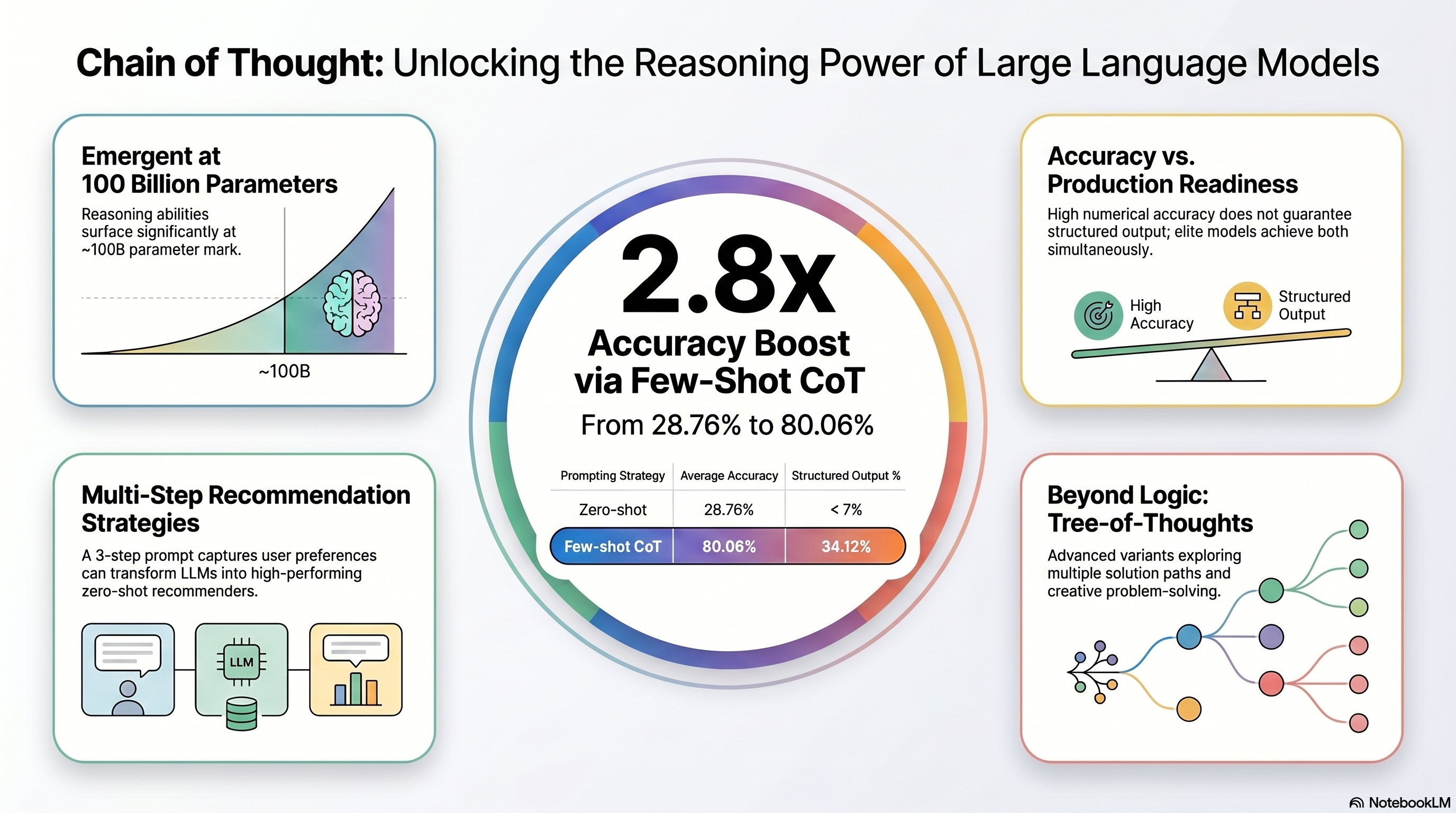
Prompt 2: Concept Infographic Studio:
Infographic → Customize
Visualize {topic} drawing on the strongest examples in the sources.
Lead with one statistic from the sources as the focal point. Surround
it with 4 supporting facts, each pulled directly from a different
source. Skip generic AI explanations.
Customizable: {topic}.
My topic: Chain of Thought
Let’s see.
Prompt 3: Visual Hierarchy Audit Studio
Slide Deck → Create your own
Generate a slide deck teaching {topic} to a creator audience. For each
slide: 1) Title (max 6 words), 2) Three bullets (max 10 words each),
3) Speaker notes citing source location. Open with a hook slide. Close
with a one-line takeaway. No filler slides.
Customizable: {topic} →
My topic: Chain of Thought
Prompt 4: Brand Voice Extract Studio
Video Overview → Create your own
Take the viewer on an immersive tour of how AI educators visually
communicate complex ideas. Anchor each scene to a specific design move
documented in the sources. Build to one signature visual that defines
the field.
Here is the output.
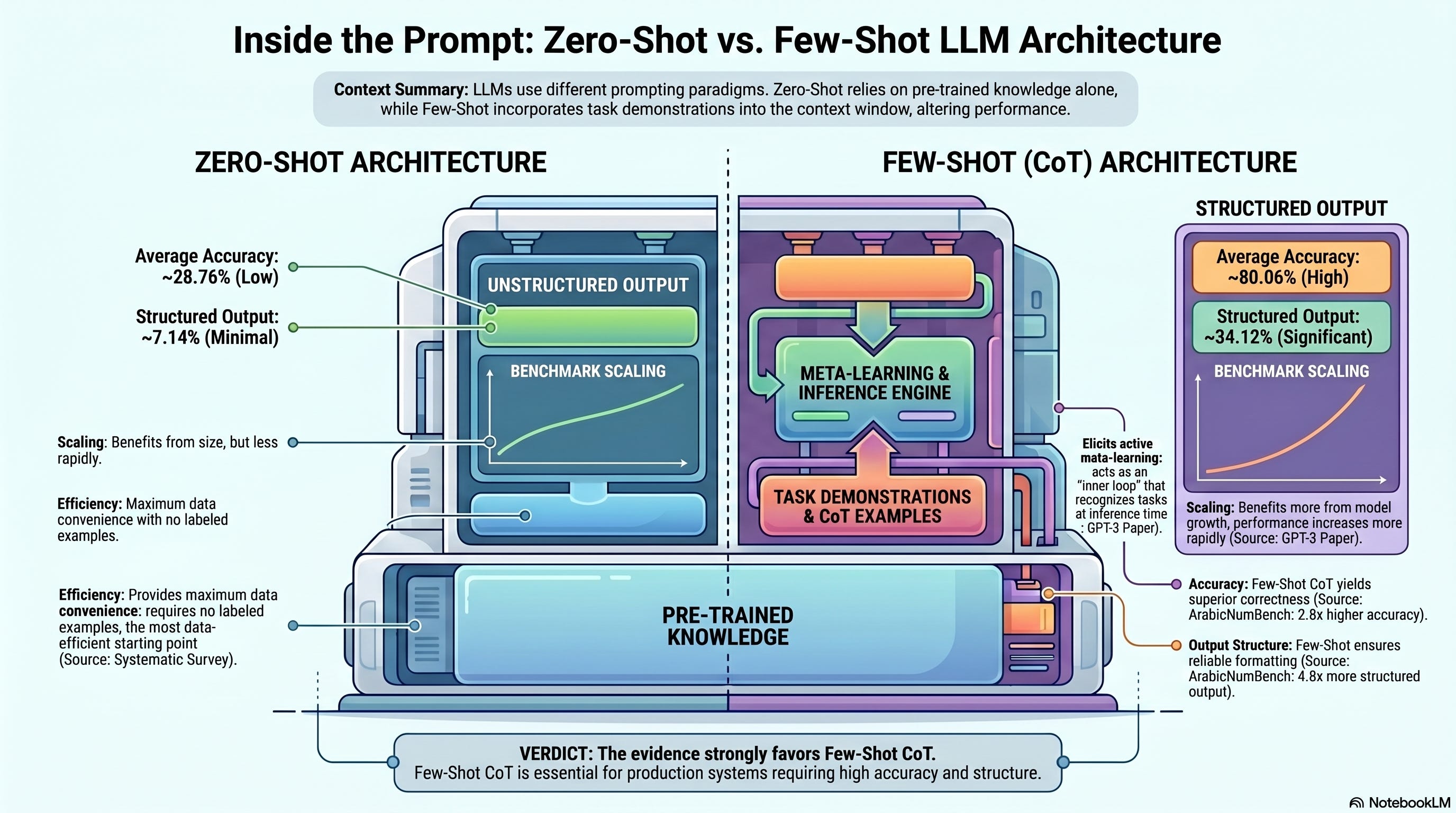
Prompt 5: Comparison Infographic Studio
Infographic → Customize
Compare two approaches from the sources side by side. Pick the two
techniques the sources contrast most often. Show 5 dimensions of
comparison. For each dimension, give a one-phrase verdict and the
source that backs it. End with one line on which approach the
evidence favors.
Here is the output.
Prompt 6: Design Principle Infographic Studio
Infographic → Customize
Visualize the core design principles for AI educational content drawn
from the sources. Lead with the single principle the sources cite most
often as the focal point. Surround it with 6 supporting principles,
each pulled from a different source. For each principle, include one
8-word rule statement and the source it comes from.
Here is the output.
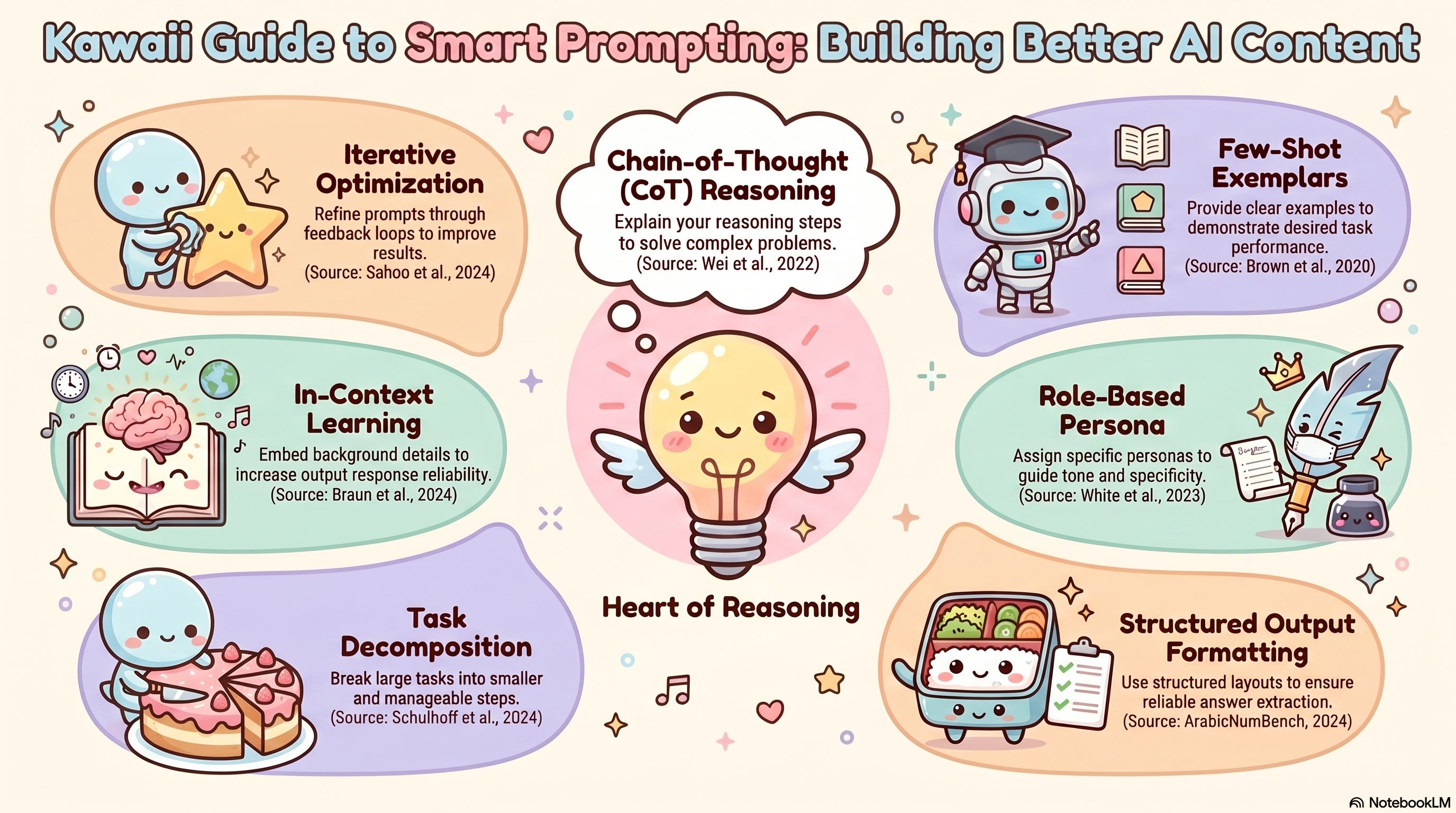
(I selected Chain-of-Thought for each topic on purpose. If you understand it even a little, just seeing it shows the power of NotebookLM.)
Next Steps
Pick one persona. Build the notebook tonight.
Do not try all four at once. The point of this post is the pattern, not the volume. Start with the persona closest to your daily work.
Steal the setup prompt as-is. Run two or three working prompts. See what NotebookLM gives back.
Once you have one persona working, the other three take 20 minutes each. The skeleton is the same. Sources, setup prompt, six prompts wired to Studio buttons.
Then start building your own. A copywriter persona for client work. A lawyer persona for contract review. A founder persona for investor questions. A coach persona for client homework. Same three-part structure, new voice.
The 24 prompts in this post are not the ceiling. They are the floor.
If you want more vault assets like this, full prompt libraries, agent setups, build walkthroughs, join the paid tier.
Steal these. Ship something this weekend.
Tell me what you built.
Super interesting approach! I like how you build it in a scalable way. It truly can be used in any context.
Claude Skills could achieve similar results. What's your take between using NotebookLM and Claude? Curious if one performs better in a specific context when the task is up for grab in both environments.
I am asking because it impacts tooling and I like simplicity. If possible I'd stick to one tool (Claude) unless NotebookLM has truly an unfair advantage in specific areas.