
Claude Code MasterClass For Everyone (Part 5): How to build an Agent Orchestration?
From a single prompt to a team of AI agents: the real architecture, the code, and what actually happens when you let Claude run the system.

A client asked me to build agent orchestration yesterday. I said yes.
Then I opened Claude Code and actually did it.
Most AI newsletters will give you '10 tips for better agents.'
I'll give you the architecture, the code, and the mistakes I made at 2 AM.
Here's what agent orchestration actually looks like when you build it, not just tweet about it.
What does “Agent orchestration” really mean?
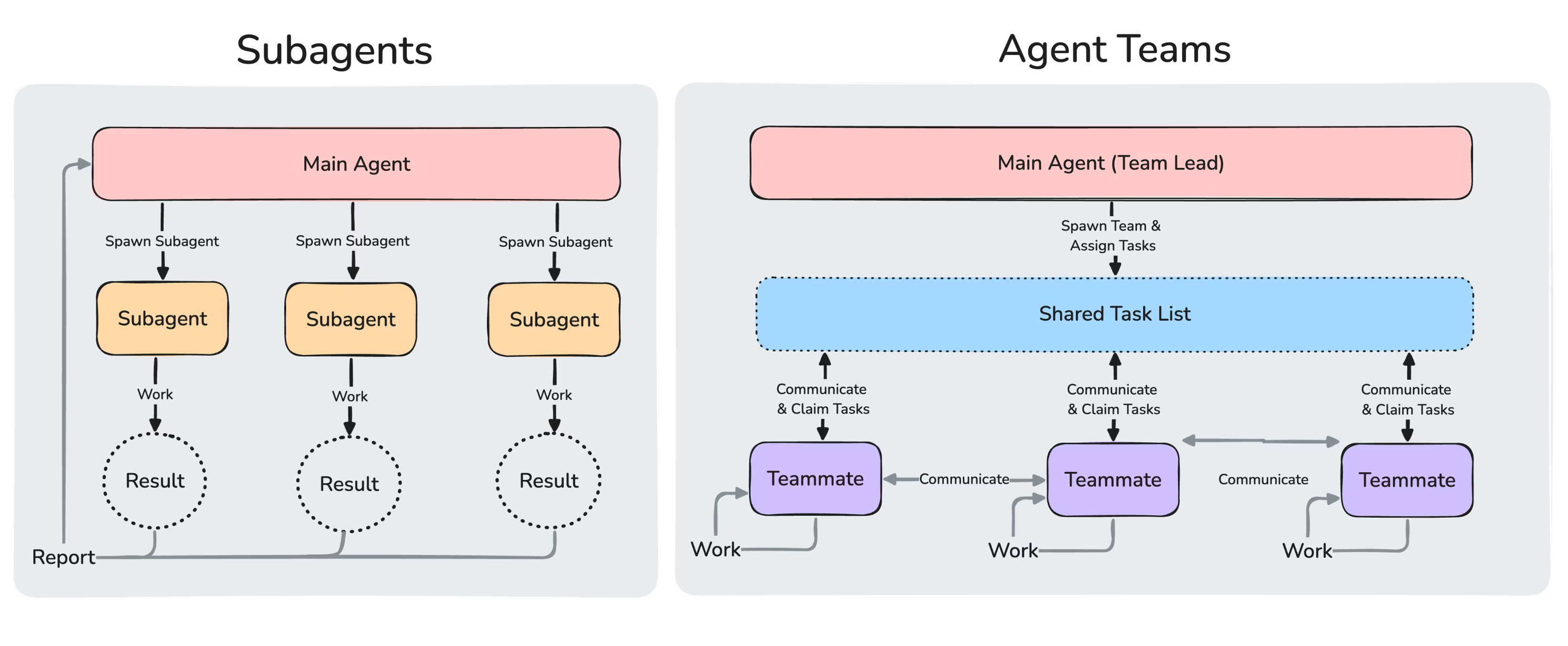
Agent teams are different from sub-agents.
They communicate. They pass work. One agent finishes, drops notes, and hands them off to the next.
You give them a task. They figure out the rest.
Previously in Claude Code MasterClass For Everyone
Part 1: Install Claude Code (just paste commands) and build your first agent, zero coding.
Part 2: Stop repeating yourself with Skills (what to do) and CLAUDE.md (who you are).
Part 3: Master 3 plugins that code better than most AI tools.
Part 4: We explored Boris’s way of using Claude Code(Boris, the creator of Claude Code)
How to install Agent Orchestration?
You should enable them in the settings.json
Here is the setting;
{
  "env": {
    "CLAUDE_CODE_EXPERIMENTAL_AGENT_TEAMS": "1"
  }
}
But don’t worry.
Just tell this to your Claude, it can do it for you with this prompt.
Hey Claude,
I just learned from Gencay that we can initiate the Agent orchestration,
by adding following code to the settings.json

Code:

{
  "env": {
    "CLAUDE_CODE_EXPERIMENTAL_AGENT_TEAMS": "1"
  }
}

For more details, can you please visit here: https://code.claude.com/docs/en/agent-teams
It handles the setup for you.
Most people see a new Claude feature and freeze. Don’t.
Install Claude Code. Then just tell it what you want.
That’s it. No manual steps. No fiddling.
It just works.
The simplest architecture that works (1 orchestrator + 3 workers)
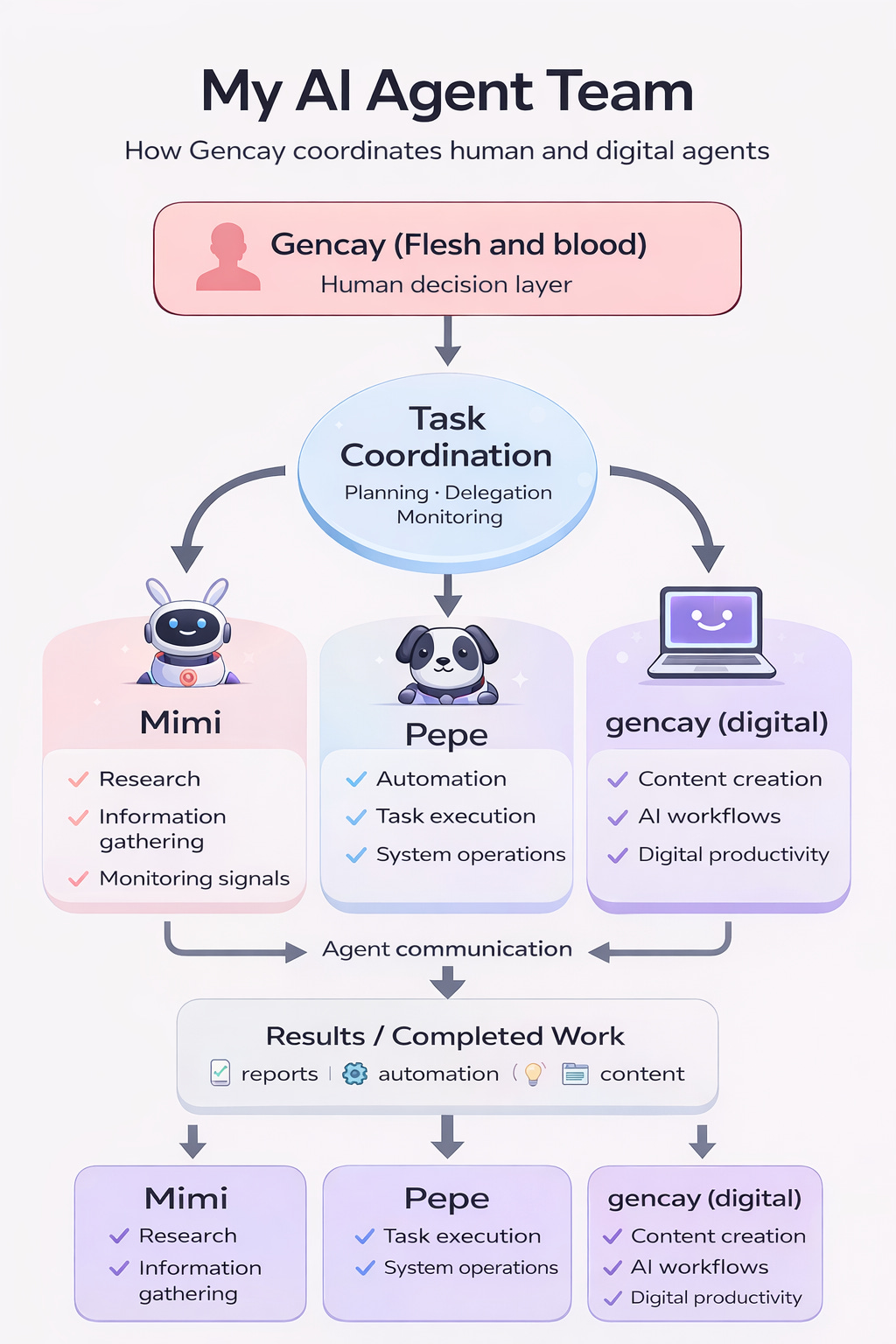
It is like a start-up.
One orchestrator at the top, that’s me, sending the first prompt
Three workers below.(Mimi, Pepe, Gencay(digital me)
Each one is a separate Claude Code instance, with its own memory, its own context.
Best thing? They can communicate with each other without asking you anything.
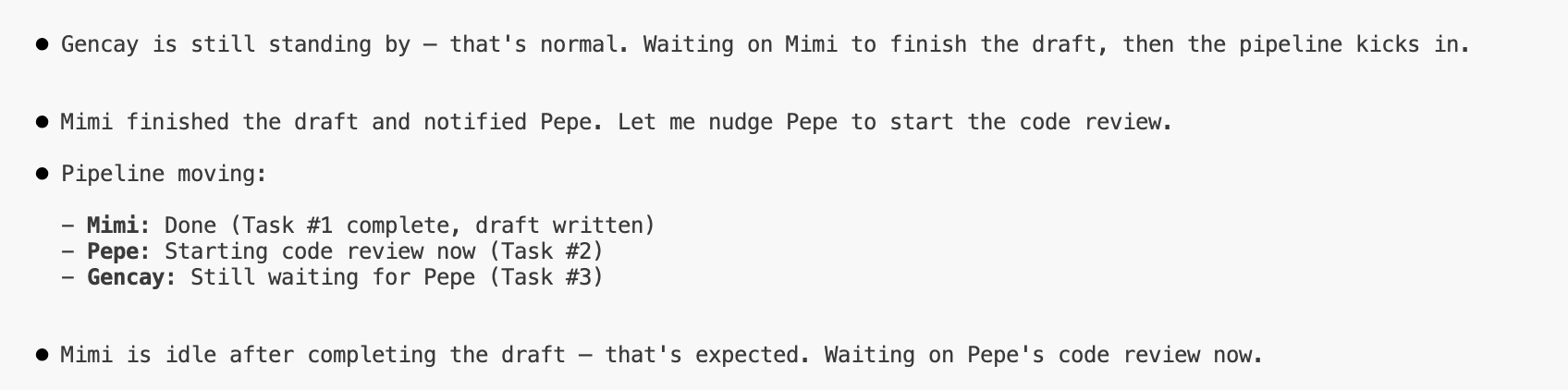
It’s like watching Sims. Except they’re actually doing things.
Look, Mimi is talking with NotebookLM while actually doing her business.
So, if I control the NotebookLM’s sources very carefully, it will be less prone to hallucinating.
Less hallucinations = Better Results
Better results = Happy Subscribers & Clients :)
LearnAIWithMe Paid Perks
The Vault is now live, with 800+ prompts you can adjust, test (with Claude API, no extra cost), and customize.
Annual ($100/yr) → Vault access (only Prompt Hub)
Founding Member ($200/yr) → Vault + AI labs + all AI tools
Monthly ($12/mo) → Full Substack content, no extras
Pick your tier. 👇
My setup to build with NotebookLM & Claude Code & Agent Orchestration
You’re probably curious how I integrate NotebookLM, and why, right?
NotebookLM & Claude Code & Agent Orchestration is the most efficient AI combo I’ve ever tested.
Here’s why it’s magical:
Claude Code pulls facts from NotebookLM, where you’ve already limited its knowledge to specific sources.
Agent orchestration lets these agents work without you.
Less attention needed.
Less hallucination potential.
Better results.
From guessing → knowing.