


In Part 1, we installed Claude Code.
Then we built an AI agent.
Zero coding.
But here’s the thing.
Every new session, Claude forgets everything.
Your style. Your rules. Your workflow. Gone.
And every complex task? You re-explain it from scratch.
That’s where Skills and Memory come in.
Skills = Claude remembers *what to do*.
CLAUDE.md = Claude remembers *who you are*.
Together? You stop repeating yourself. Forever.
1. Fast-Forward: What We’re Building
Yesterday I got a job offer on Upwork.
They want a system where buyer agents can explore property trends.
Here is the exact message:

Price comparisons. Suburb analysis. Market insights.
Interactive. Visual. No code required from their end.
Here is what they want;
Streamlit property analytics dashboard.
Claude Code writes the code.
A Skill handles the repetitive parts.
A CLAUDE.md makes sure Claude knows our rules from the start.
We’ll build this system together, using skills and.MD file.
Let me show you what I’ve built, under 30 minutes.
What just happened?
18,000+ Texas Airbnb listings. Six tabs. All reactive.
Overview, Map, Price Analysis, Data Explorer, Price Predictor, Comp Finder.
Two files made this possible.
The Skill trained Claude on Streamlit, right rules, right libraries, no crashes.
The CLAUDE.md told Claude who the client is, what currency, and what “done” looks like.
No re-explaining. No wrong charts. No matplotlib accidents.
Just the prompt. Then the app.
Best part? You don’t have to know Streamlit to build this.
2. What is CLAUDE.md?
CLAUDE.md is a file Claude reads at the start of every session.
Automatically. No prompting needed.
Think of it as your project’s rulebook.
Without it, you re-explain your style, your rules, your structure every single time.
With it, Claude already knows.
Two types:
- Global: Applies to every project
- Project: Applies to this project only
You can have both.
How to install the Claude.md file?
Open your project in Claude Code.
Run:
/initClaude scans your codebase, reads your files, config, and structure, and generates a starter CLAUDE.md automatically.
Then you edit it.
Add your rules.
What is best practice in Claude.MD Structure?
3-4 sections. That’s it.
## Project Overview
[2-3 sentences. What this is. Who it's for.]

## Voice & Tone
- Direct, no fluff
- Short sentences

## Immutable Rules
- ALWAYS use USD for prices
- NEVER delete files without asking
- NEVER commit API keys

## File Structure
- Posts: /posts/YYYY-MM-DD-title.md
- Drafts: /posts/drafts/
Keep it concise.
Claude reads this every session.
Only include what it should always know.
Otherwise, your limits run out.
Faster than you think.
3. What is CLAUDE Skills?
Skills are saved instructions.
Write them once.
Trigger them anytime.
Type skill-name or let Claude load them automatically when relevant.
No more repeating yourself.
Instead of typing “review this code for security issues, check readability, summarize in 3 bullets” every single time, you write it once as a Skill.
Then: `/review`.
Done.
How to install the Claude skills?
Go to the web.
Find a skill.
Or a source to train a skill.
Tell Claude Code to build skill from this source:
Here is the link:
Build [ ] skills for me from this link.
That’s it.
For instance, the /frontend-design skill is now available in every project.
How do you think people end up building front-ends that keep crashing?
What is the structure of Claude Skills?
Every Skill is in one folder.
One required file: `SKILL.md`.
Here is what it looks like:
my-skill/
├── SKILL.md        ← required
├── examples.md     ← optional
└── scripts/
    └── helper.py   ← optional script Claude can run
Inside `SKILL.md`: two parts.
Frontmatter (configuration) + instructions (what Claude does).
Let me show you mine. /letsdecide
Here is what it looks like;
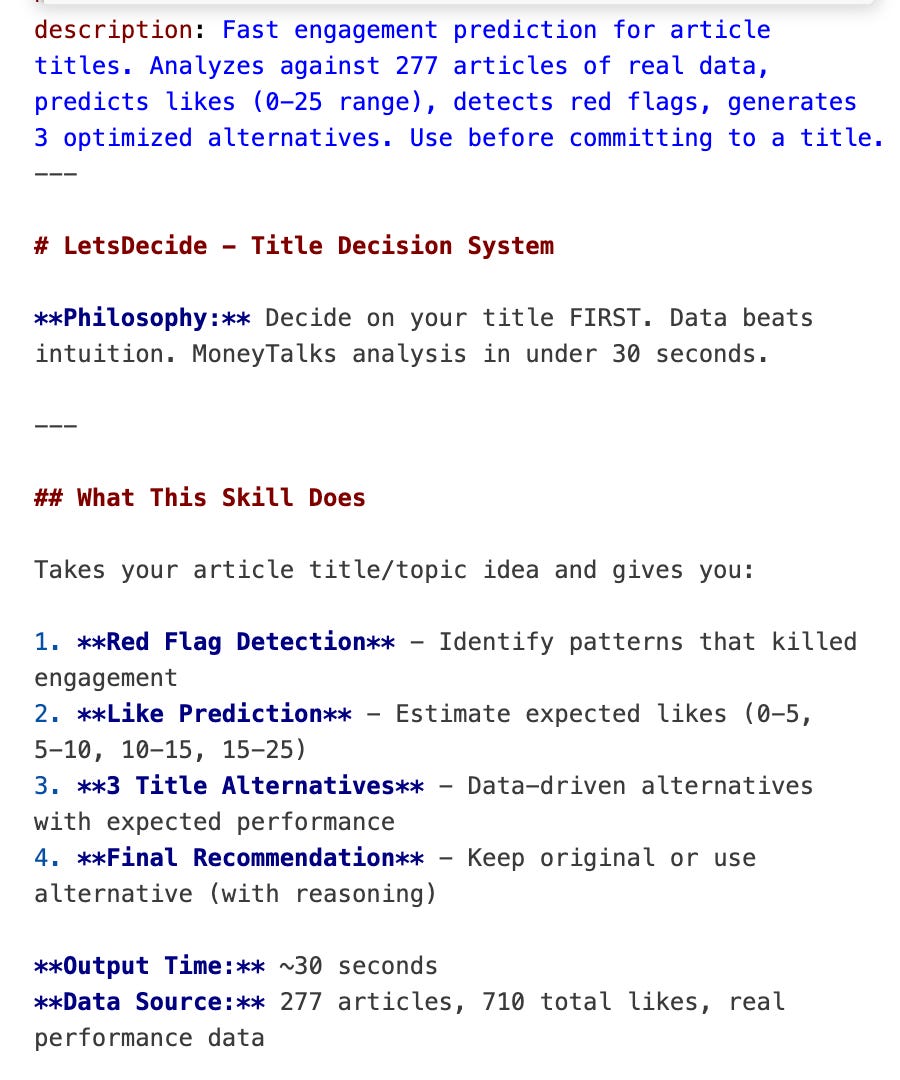
I feed it my past article stats.
It learns the patterns.
Knows what worked.
What flopped.
Then I give it my next article idea and title.
It spots red flags.
Suggests improvements.
Even predicts performance. All based on real data, not guesswork.
4. How to build with Claude Skills and Memory?
Now the good part.
Let’s step-by-step build a Claude Skill.
And set up a CLAUDE.md file for a real project.
I’ll point you to two sources packed with community Skills and MD examples.
60K+ Skills and a lot of MD files.
Browse them. See what others built.
Then we’ll build ours.
Also, let me show you the best practices for Skills + CLAUDE.md, then we'll build everything step by step.