
The "Developer Tool" That's Quietly Taking Over Content Creation
5 Claude Code workflows every creator can steal - no coding required



At first, you must agree that Claude Code is not just for technical people.
That’s why I created a Claude MasterClass for Everyone a couple of weeks ago.
You can use it for more than just building things.
Building systems to write content, for instance.
Just like Ilia did.
Ilia built a system. Not an app. Not a script. A full content production system inside Claude Code.
Here’s what he did:
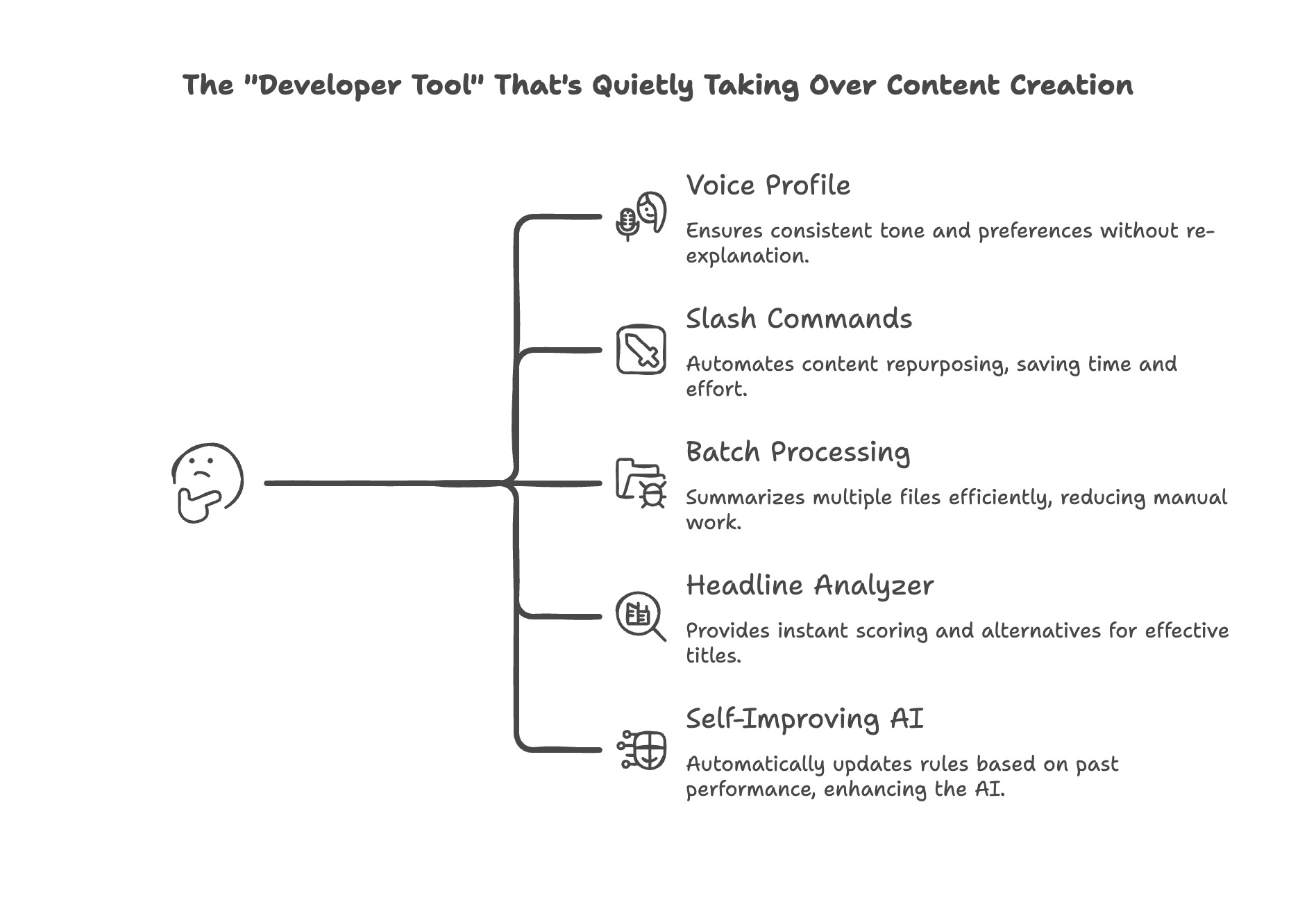
Before continuing, you might want to check out his latest posts on his newsletter:
Commands vs Skills vs Agents in Claude Code: What Nobody Explains
Opus 4.6 Dropped. The Benchmarks Are the Least Interesting Part
Here’s Ilia.
Most creators hear "Claude Code" and think that's for “developers". I thought the same thing. Initially. Not anymore.
Then I installed it. Claude Code is Claude - the same Claude you already use in chat - but running on your computer with access to your files, the web, and custom commands you build yourself.
What makes it different from regular Claude chat? 4 things:
1) Persistent memory - it remembers your preferences across every session
2) File system access - it reads and writes files directly on your computer
3) Custom commands - you type one word, and it runs an entire workflow
4) Autonomous execution - you give it a brief, and it chains 10 steps without you prompting each one
Claude Code has exploded beyond developers. Creators, marketers, consultants, solo operators - people who never open a terminal are using it for content, research, and workflow automation. And once you see what it can do, you’ll understand why.
Before I share the workflows, one thing: the first thing I did after installing Claude Code was create a voice profile file. It’s a document that captures who I am, how I write, who my audience is, my preferences, my opinions about tools. Sections for my tone, my always/never rules, my personality traits, what topics I cover. One file that gives Claude everything it needs to sound like me instead of a generic assistant.
Every workflow below connects back to this file. It's what makes Claude Code feel like a colleague instead of a stranger.
I've put the full folder structure with all the templates and command files in one download, grab it here and you can start using these workflows immediately.
Let's get into each one of them.
1. Claude Code Voice Profile: Make Claude Sound Like You Every Session
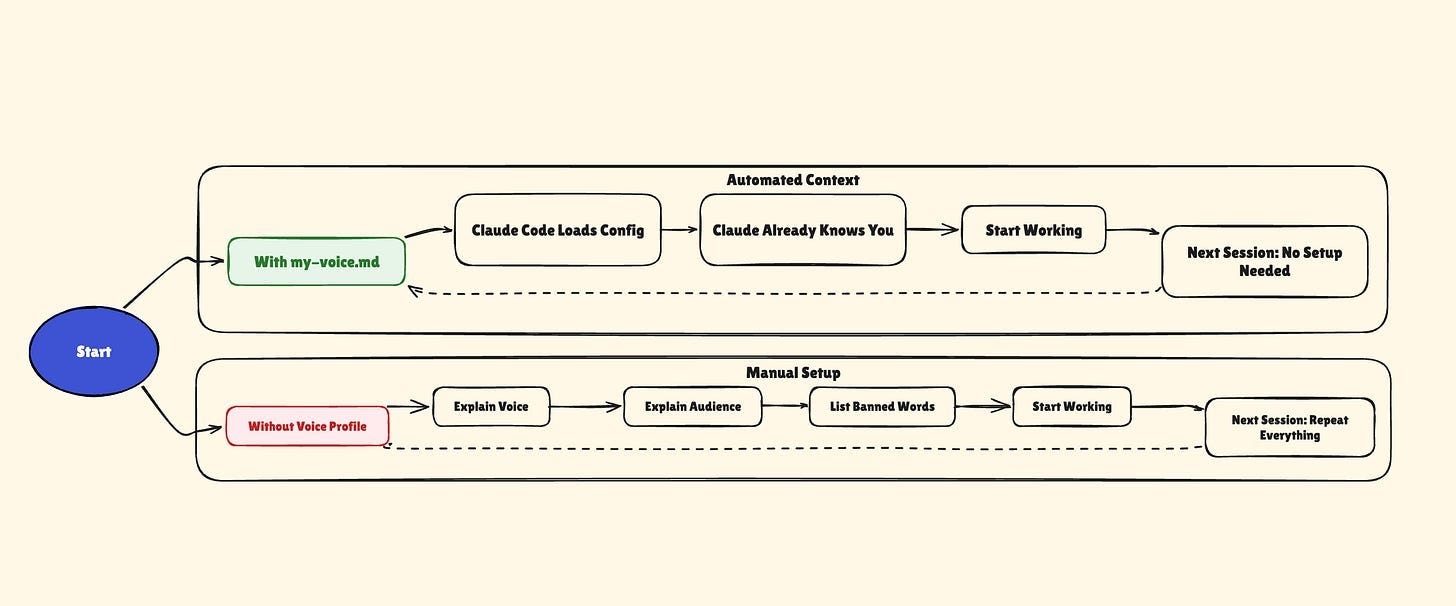
Every time you open Claude chat, you start from zero. You re-explain your voice. You remind yourself who your audience is. You paste your formatting preferences. Next session, it’s all gone again, and you’re back to square one.
Claude Code fixes this with two files. First, you create a voice profile — a file called “my-voice.md” that captures everything about how you write. Then you add one line to “CLAUDE.md” (a special file Claude Code loads automatically on startup) telling it to read your voice profile. That’s it. Every session after the first one, Claude already knows you.
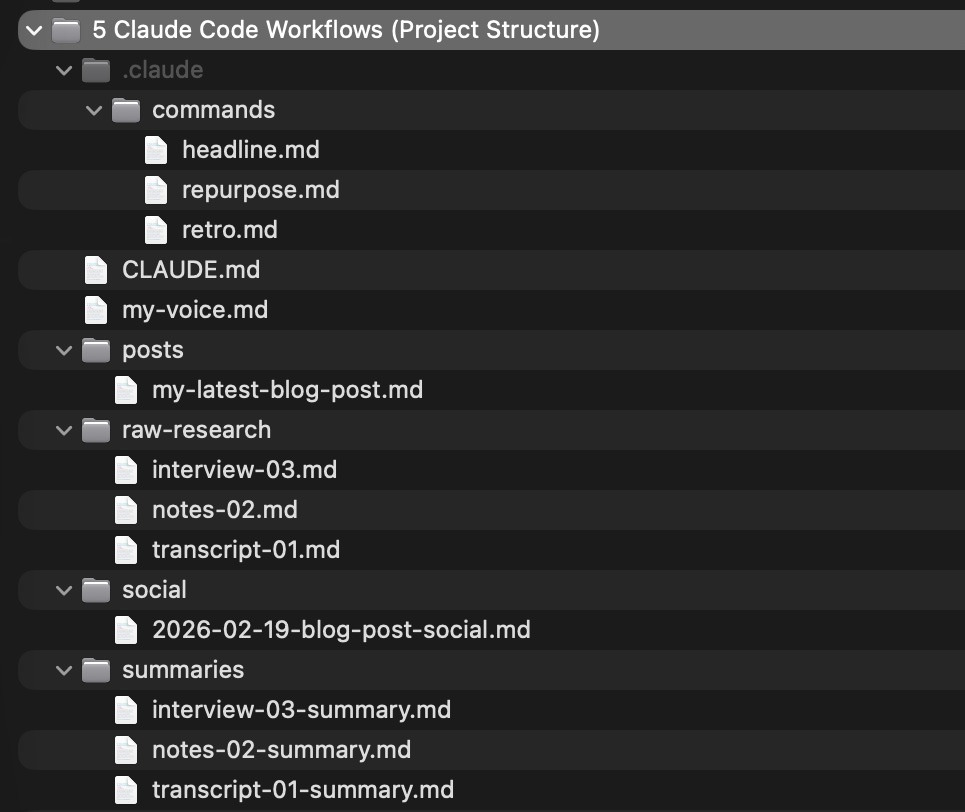
Here’s a starter template for “my-voice.md”
# My Voice Profile

## Who I Am

[Describe yourself in 2-3 sentences. What do you do? What’s your area of expertise?]

## My Voice

[How do you write? Casual? Formal? Direct? Describe your tone like you’re explaining it to a new colleague.]

## My Audience

[Who reads your stuff? What do they care about? What level of expertise do they have?]

## Words I Never Use

- “Delve”, “landscape” (used abstractly)

- “Leverage” as a verb — just say “use”

- “Robust”, “seamless”, “cutting-edge”

- [Add your own AI-sounding words here]

## My Personality (rate yourself 1-10)

- Humor: [X/10]

- Contrarianism: [X/10]

- Personal vulnerability: [X/10]

- Technical depth: [X/10]

- Urgency/intensity: [X/10]

## What My Readers Push Back On

- [When I talk about X, they worry about Y — always acknowledge this]

- [They’re skeptical of Z — address it head-on, don’t ignore it]

- [They think A is overhyped — agree partially, then show the nuance]

## Red Flags — If You Generate These, Rewrite

- Opening with a question I’d never actually ask

- Ending with a generic motivational sentence

- [Add patterns you keep correcting]

## What I Believe

- [Your core opinion about your topic — this shapes content direction]

- [A contrarian take you hold — this prevents generic output]

- [What you think most people in your space get wrong]
Most voice profiles stop at tone and banned words. The sections above — personality spectrums, reader objections, red flags, and your actual beliefs — are what turn a style guide into something that genuinely sounds like you. Add sections for formatting preferences and content rules too.
Save this as “my-voice.md” in your project folder — or grab the ready-made template from the download folder. Then add this line to your “CLAUDE.md”:
Always read and follow the voice profile in my-voice.md before generating any content.Open Claude Code in that folder and your voice profile loads silently. Claude already knows your voice, your audience, your banned words. You just start working. Every session feels like picking up a conversation with someone who already knows you.
Simple example I can think of: I really don't like when AI sounds like a hyped-up marketer. I added a strict rule to my profile: *"Never use pushy/salesy formatting (emojis, exclamation marks, aggressive CTAs)."* Now, when I draft a post, Claude automatically strips out the fake enthusiasm and keeps my tone direct and professional—without me ever having to prompt "make it less salesy."
If you do nothing else from this post, do this. Every workflow below builds on it.
Left side is what most people do with regular Claude. Right side is what happens with a voice profile. Here’s the difference in practice:
2. Claude Code Slash Commands: Repurpose One Post Into 9 Pieces
You wrote something. A blog post, a newsletter, a long-form piece. Now you need it on LinkedIn, X, or Substack Notes. Different hooks, different lengths, different formats. By hand, that’s another 30-60 minutes of reformatting after you’ve already done the hard part of writing.
Or you can type “/repurpose” and walk away.
Claude Code supports custom slash commands. You create a markdown file that describes what you want, save it in the right folder, and it becomes a command you can invoke with a single word. Point it at whatever you wrote and it generates all platform versions in one shot.
Here’s the command file:
# Content Repurposer

Read the file specified by the user.

## What to Create

Generate 9 pieces of content from this piece:

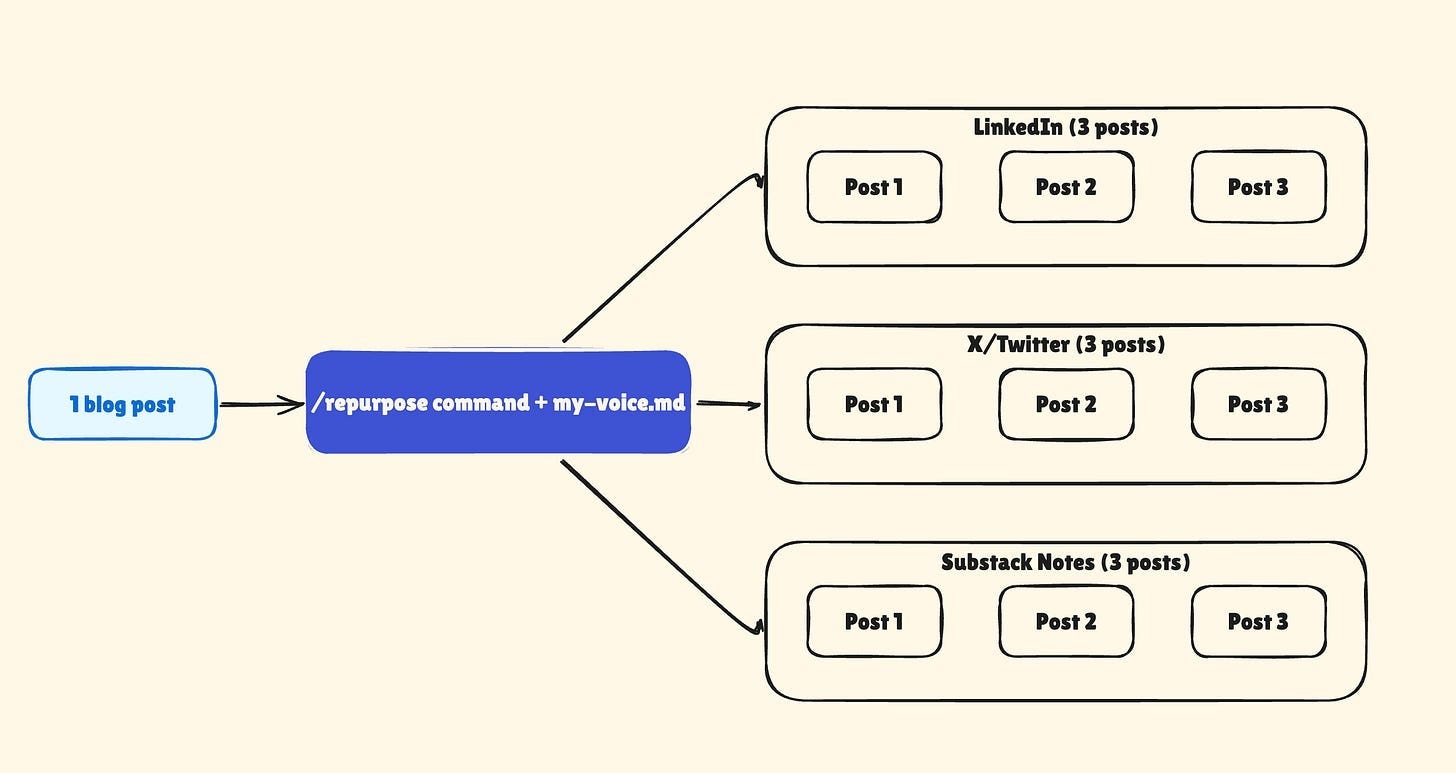
- LinkedIn (3 posts) — professional, first-person, ~1,200 chars each

- X/Twitter (3 posts) — punchy, mix of tweets and short threads

- Substack Notes (3 posts) — conversational, mid-length

## Rules

- Every piece must stand alone with a unique hook and angle

- Match the voice and tone from my-voice.md

- Include a natural CTA linking back to the full piece

## Output

Save all content to social/YYYY-MM-DD-[topic]-social.md
Save this as “~/.claude/commands/repurpose.md”. Or just ask Claude Code to create it for you:
> Create a slash command called “repurpose” that reads a file I specify and generates 9 pieces of content:

3 LinkedIn posts
3 X/Twitter posts
3 Substack Notes

Each piece should stand alone with a unique hook, match my voice from my-voice.md, and include a CTA.
Save output to social/YYYY-MM-DD-[topic]-social.md.
Claude Code will create the file and put it in the right folder.
Now type “/repurpose my-blog-post.md” in Claude Code. One command, 9 pieces of content, saved to a folder. Done.
Recently, I wrote a deep dive on how reasoning models like o1 and DeepSeek-R1 don’t just “think harder” but actually run internal committees. I ran /repurpose, and it instantly pulled out a teaser (”You’re paying 3x more for reasoning models...”), a contrarian take for Substack Notes, and an actionable prompt tactic for LinkedIn. All the posts matched my exact tone.
This is where the voice profile pays off. The repurposed content sounds like you because Claude already has your writing patterns loaded. It has your voice file, your banned words, and your formatting preferences already in memory. No re-explaining needed for each platform.
One piece of content in, nine pieces out. Here’s what the flow looks like:
3. Batch Processing Files With Claude Code: 20 Files in Minutes
You have 20 raw files sitting in a folder. Meeting transcripts. Research notes. Interview recordings you ran through a transcription tool. They all need to be summarized, organized, or reformatted.
Try pasting 20 files into a chat window. The context limit kills you by file five.
With Claude Code, you wouldn’t have this problem. It reads files directly from your computer. So you just point it at a folder and tell it what to do.
Here’s the exact prompt you can use:
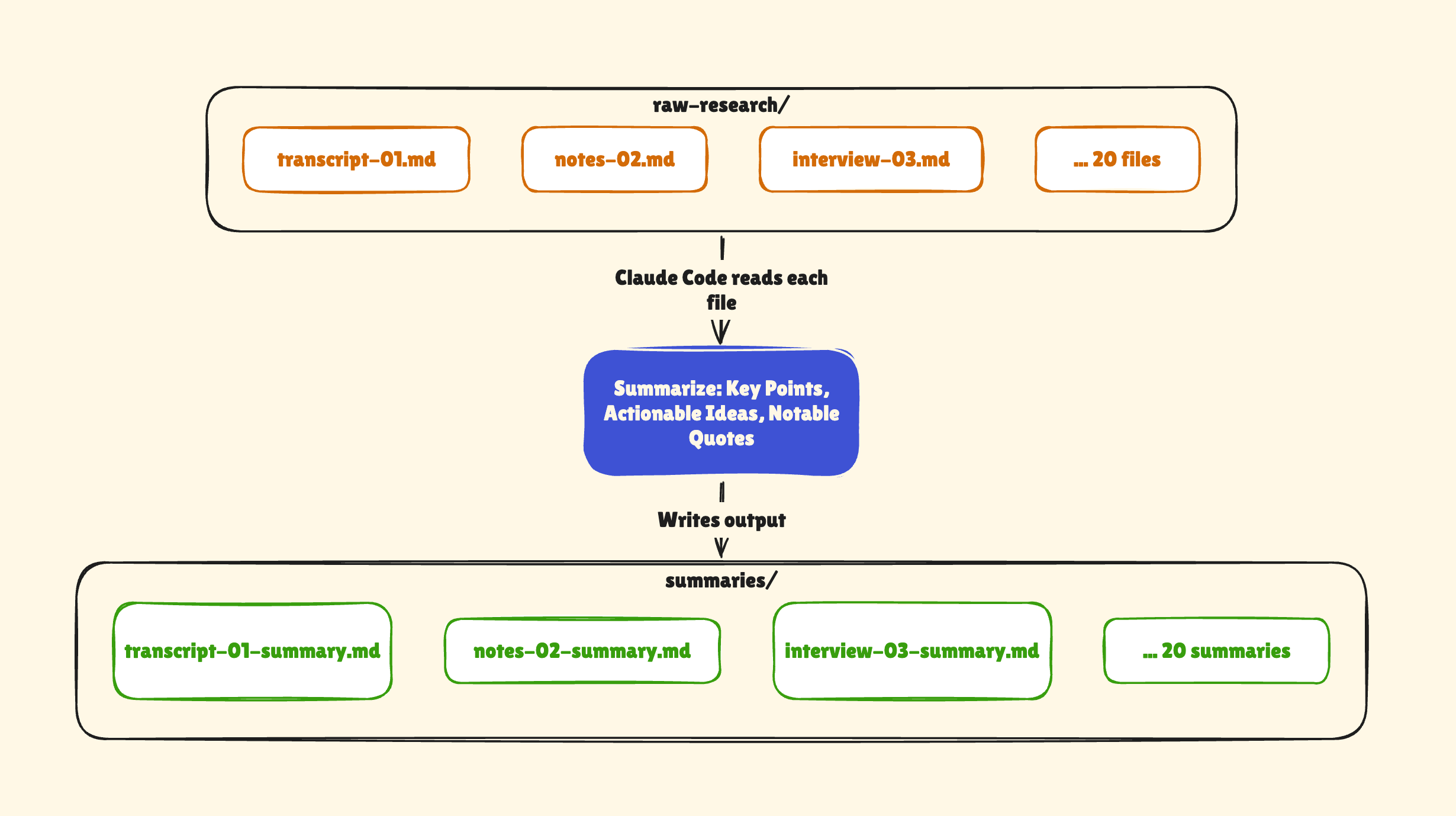
Read every file in the “raw-research/” folder.
For each file, create a summary with these sections:

- Key Points (3-5 bullets)
- Actionable Ideas (things I can use in my content)
- Notable Quotes (anything worth referencing).

Save each summary as a new file in “summaries/” with the same filename plus “-summary” at the end.
This isn’t a saved command. It’s a prompt. But it’s a prompt that only works in Claude Code because it needs file system access.
What happens when you run it: Claude Code scans the folder and finds all 20 files. It reads each one: text files, markdown, even PDFs. It creates 20 structured summaries. It saves them to a new folder, named consistently. The whole thing takes a few minutes.
For example, Perplexity has a feature where you can download your entire research conversation as a Markdown file. Sometimes, I spend hours and days digging into different AI content and downloading those threads into my `raw-research/` folder. I ran this prompt, and 3 minutes later I had perfectly formatted summaries pulling out the exact bugs I hit and the workarounds I used, ready to be turned into a newsletter issue.
Imagine doing this with 20+ files by hand. That’s a full afternoon of opening, reading, note-taking, and organizing. Claude Code does it in minutes.
The pattern works for anything batch-oriented: extracting action items from meeting notes, converting transcripts into drafts, and categorizing a backlog of notes. Read a folder, process each file, output structured results.
The whole process is three steps: raw folder in, Claude Code processes, structured folder out.
4. Claude Code Headline Analyzer: Score Your Titles Before (I use this regularly)
You stare at your headline for 10 minutes. You change three words. You change them back. You publish it anyway, unsure if it’s actually good or just good enough. I used to do that.
Headlines make or break your content. A weak title means nobody clicks, no matter how good the piece is. But most creators treat headlines like guesswork instead of a system.
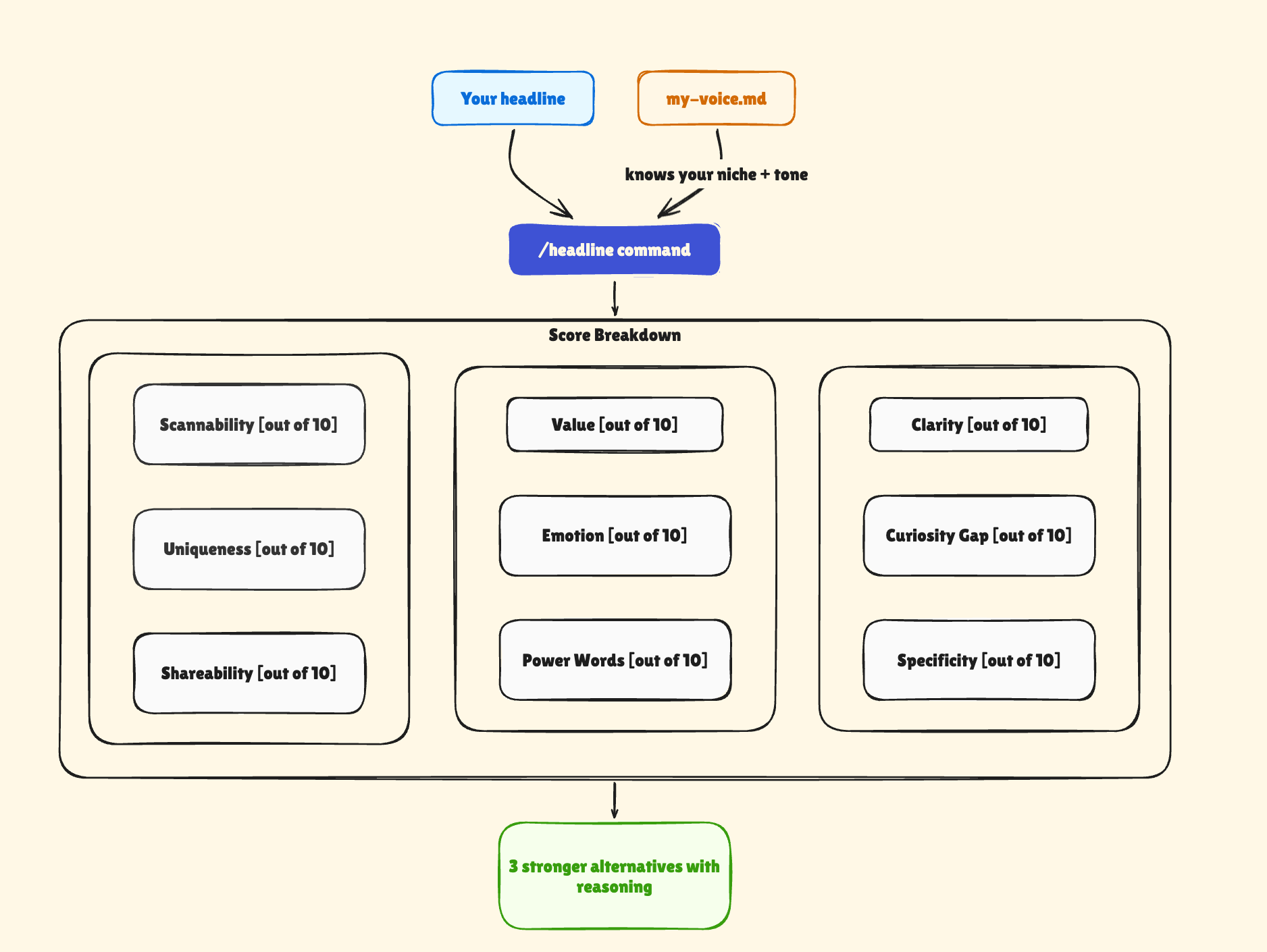
So I built a slash command that scores any headline across 9 factors, then suggests alternatives that score higher.
Here’s a simplified version of the command:
# Title Analyzer

Analyze the title and subtitle provided by the user.

## Score These Factors (1-10 each)

1. **Clarity** — Is the topic immediately obvious?

2. **Curiosity Gap** — Does it create tension the reader wants to resolve?

3. **Specificity** — Numbers and concrete details beat vague promises

4. **Value Proposition** — Is the benefit to the reader explicit?

5. **Emotional Hook** — Does it trigger curiosity, FOMO, or recognition?

6. **Power Words** — Action-oriented language, not generic filler

7. **Scannability** — Can you read it in 2-3 seconds?

8. **Uniqueness** — Does it stand out from typical headlines in your niche?

9. **Shareability** — Would forwarding this make someone look smart?

## Then Generate 3 Alternatives

Use these structures:

- “How to [action] (without [common pain])”

- “[X] [things] that [outcome]”

- “The [specific thing] that [result]”

- “[Bold claim]. [Qualifier].”

Only suggest alternatives that would score higher than the original.

## Output

Score table, what’s working, what could improve, alternatives with reasoning.
Save this as “~/.claude/commands/headline.md”. Or ask Claude Code to create it (scroll to the right):
Create a slash command called “headline” that takes: a title and subtitle, scores them across 9 factors (clarity, curiosity gap, specificity, value proposition, emotional hook, power words, scannability, uniqueness, shareability) on a 1-10 scale, then generates 3 alternative headlines that score higher. Output a score table, what’s working, what could improve, and the alternatives with reasoning.Now type “/headline “Your Title Here” “Your subtitle here”“ and you get a score breakdown in seconds. No more guessing. No more “looks fine.” You see exactly which factors are weak and get alternatives designed to fix them.
For example, two weeks ago I ran this on my CLAUDE.md learning-loop post and got: “Strong emotional hook, good specificity, unique angle. Minor suggestion: ‘CLAUDE.md’ as the first word can limit non-Claude-Code readers.” I tweaked the title and subtitle accordingly to broaden appeal while keeping the core hook.
This is another place where your voice profile matters. The analyzer knows your niche, your audience, and your tone from “my-voice.md” — so the alternatives it suggests actually sound like something you’d write, not generic clickbait.
Your headline goes in, a score and better options come out. The voice profile makes sure the alternatives match your style. Here’s how it looks like:
5. Self-Improving AI: How Claude Code Updates Its Own Rules
Your AI outputs have the same issues over and over. You keep correcting the same tone problems. You keep removing the same filler phrases. You keep re-adding the same formatting rules. But next session, Claude has forgotten everything and you start the correction cycle from scratch.
What if Claude could review its own output, figure out what’s working and what isn’t, and update its own rules?
That’s what my retro analyzer does. It’s a slash command that reads my recent content, extracts patterns, and writes new rules directly into my “my-voice.md”. Next session, those rules are already loaded.
Here’s a simplified version:
# Retrospective Analyzer
Review my recent content output and update the system to perform better.
## Step 1: Read Recent Work

Read the last 3-5 pieces of content I’ve published from the posts/ folder.

## Step 2: Analyze Patterns

For each piece, evaluate:

- What worked well (structure, hooks, examples that landed)

- What fell flat (weak sections, unclear points, tone mismatches)

- What feedback I received (if noted in the files or in a feedback/ folder)

## Step 3: Extract Rules

From the patterns, create:

- Keep doing: Tactics that consistently worked (be specific)

- Stop doing: Patterns that consistently failed

- Try next: One experiment for the next piece

## Step 4: Update my-voice.md

Append the new rules to my-voice.md under a “## Recent Learnings” section.

Format them as bullet points Claude can follow in future sessions.

## Step 5: Report

Show me what you found and what you changed. I want to approve

the updates before the next session uses them.
Save this as “~/.claude/commands/retro.md”. Or ask Claude Code:
Create a slash command called “retro” that:

- Reads my last 3-5 posts from the posts/ folder
- Analyzes what worked and what didn’t
- Extracts keep/stop/try rules
- Appends them to my-voice.md under a “Recent Learnings” section.

Show me what changed before the next session uses it.
Type “/retro” and Claude Code reads your recent posts, spots what’s working and what isn’t, and adds new rules directly to your “my-voice.md”.
Next time you open Claude Code, those rules are already loaded. You didn’t paste them. You didn’t remind Claude. The system updated itself.
This is the only workflow here that’s a loop. Every cycle makes the next one better.
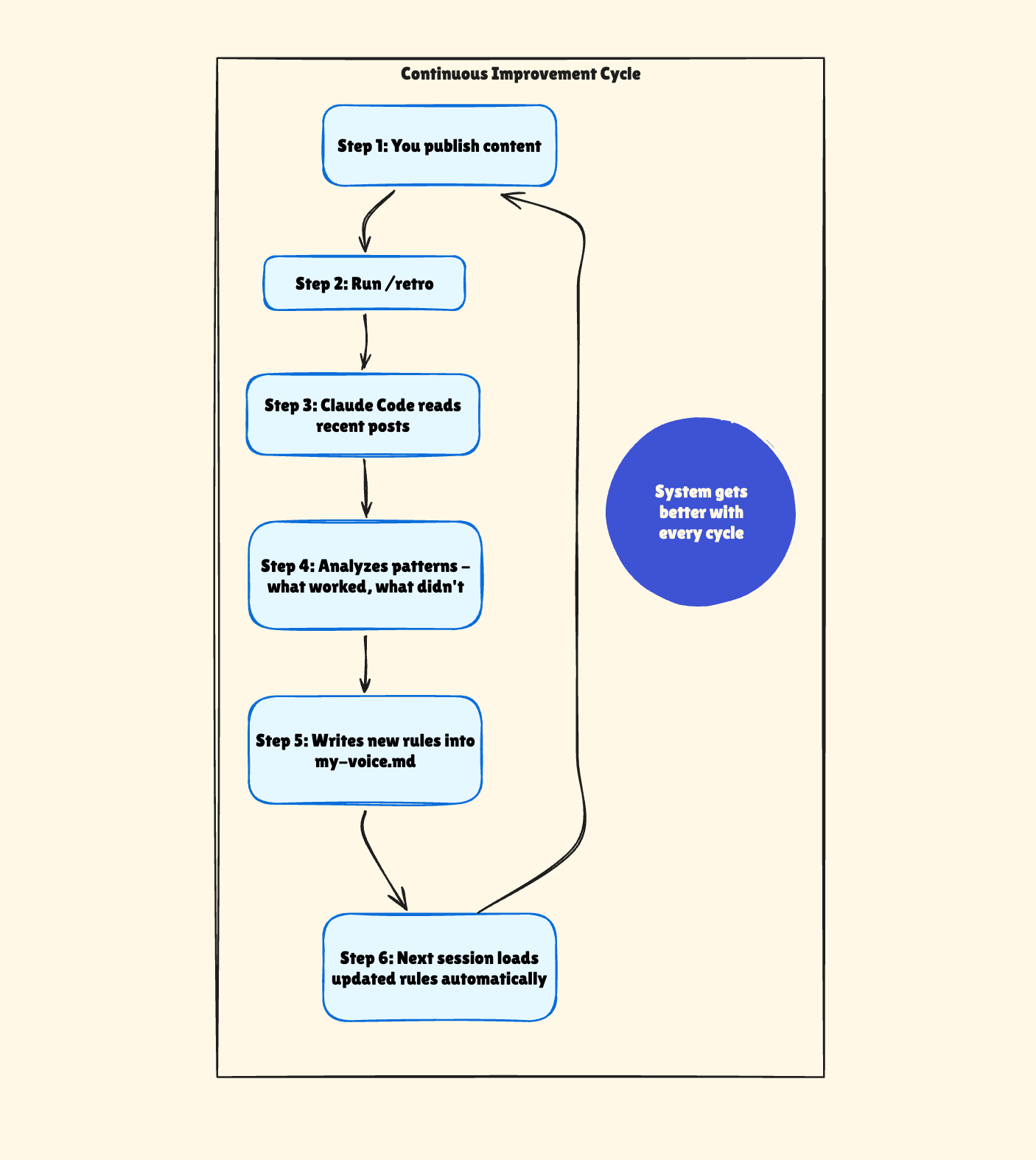
The “my-voice.md” you set up in workflow 1 isn’t something you write once and forget. The retro analyzer rewrites parts of it based on what’s actually landing with your audience. I run “/retro” after every few posts now. Each time, Claude Code finds patterns I missed and adds rules I wouldn’t have thought to write. My content system genuinely improves without me managing a spreadsheet of “what worked.”
For instance, after a recent batch of posts, the analyzer cross-referenced my starred notes - the ones that consistently got 10+ likes and restacks - and found a pattern: every top performer used a sharp contrast and closed with a declarative statement, never a question. It appended a rule: "Open with contrast, close with a statement - never a question." My next few notes followed it and did better.
Why Claude Code Works for Creators (Not Just Developers)
These 5 workflows all run on a “coding tool” that most creators haven’t tried. But the pattern is the same across all of them: Claude Code gives Claude abilities that regular chat can’t match.
Your voice profile means you never re-explain yourself. The repurpose command turns one piece into nine. Batch processing handles a folder of 20 files in minutes. The headline analyzer scores your titles before you publish. And the retro analyzer makes the whole system improve itself over time.
The setup takes an afternoon. Maybe less. The time saved compounds every week.
If you try one thing from this post, start with “my-voice.md”. It’s the lowest barrier to entry and the foundation for everything else. Create the file. Describe your voice. List your rules. Open Claude Code. Or grab the whole folder and start immediately.
You’ll never re-explain yourself to an AI again.
 | A guest post by
|